Quick tipDeveloperContent Hub

Add schema markup (structured data) to HubSpot pages and posts

Template-level schema covers every post at once.

Subscription
All CMS tiers
Permissions
Design tools access for templates
Time
4 min · Intermediate
Last verified

Short answer

HubSpot's developer blog covers adding structured data directly to a template (for example the blog post template) with HubL variables, then validating with Google's Rich Results Test. For a single page, the page's head HTML works too.

1. Design Manager

Templates live in the design manager in my demo portal.
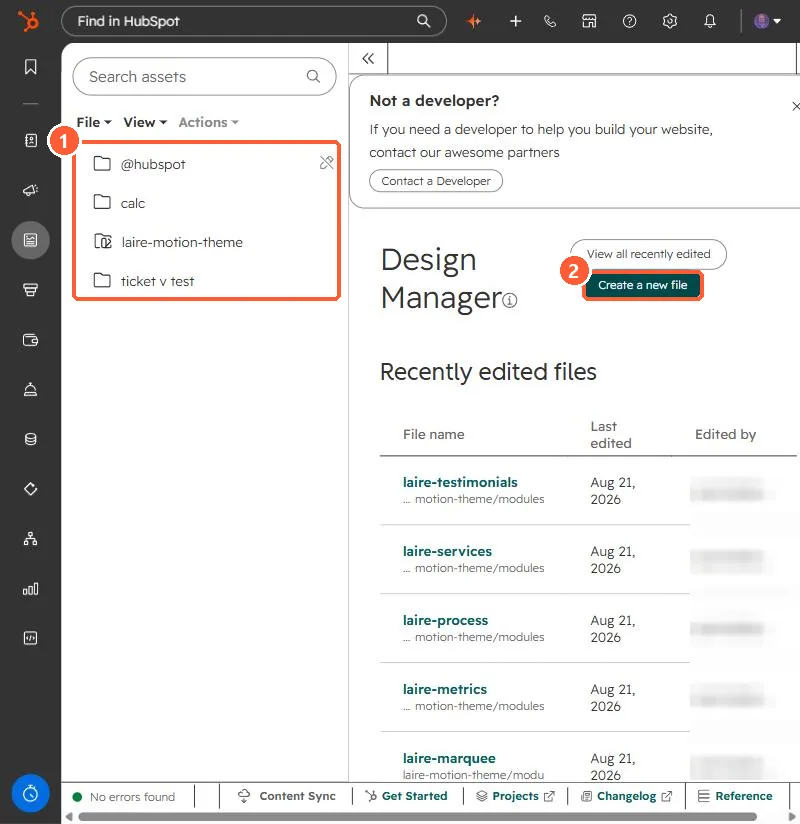
Design Manager file tree with theme folders and a Create a new file button
Theme folders (1) and Create a new file (2).

2. Example

<script type="application/ld+json">
{ "@context": "https://schema.org", "@type": "BlogPosting", "headline": "{{ content.name }}" }
</script>

3. Related

FAQ schema module.

Sources

New field notes by email

One email when a new article publishes.

Still stuck?

If this did not fix it, the problem is probably specific to your setup. Book a call and we will look at it together.

Book a call with Sam