Quick tipHow toMarketing HubContent Hub

Set up your brand kit: logos, favicon, colors, fonts and theme

The brand kit is the source HubSpot tools pull logos, colors and fonts from.

Subscription
All tiers; multiple brands need the Brands add-on
Permissions
Brand settings access
Time
3 min · Beginner
Last verified

Short answer

Marketing > Brand opens Brand Identity with Brand kit, Brand voice and Brand knowledge tabs. The brand kit holds logos, favicons, colors, fonts and a brand theme for pages and blogs. HubSpot's KB advises choosing a fallback font with a similar x-height and weight to your custom font. With the Brands add-on, pick the brand from the dropdown first.

1. The brand kit

My demo portal's brand kit has no logo or favicon yet.
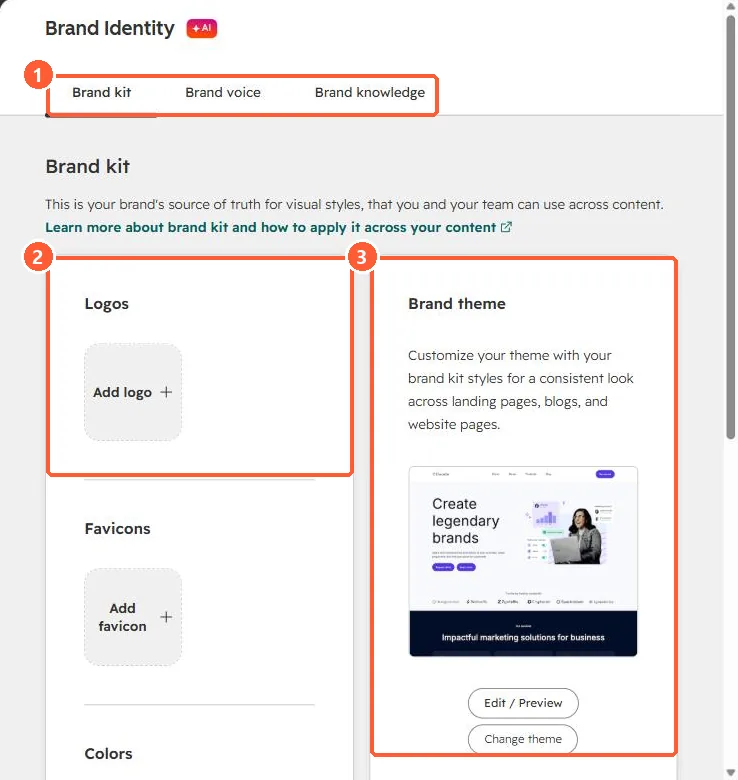
Brand Identity page with Brand kit, Brand voice and Brand knowledge tabs, empty logo and favicon slots and a brand theme preview
Tabs (1), logos and favicons (2), and the brand theme (3).

2. Why it matters for AI

AI tools use brand voice and context. See Agent Hub context.

3. Related

Module font controls.

Sources

New field notes by email

One email when a new article publishes.

Still stuck?

If this did not fix it, the problem is probably specific to your setup. Book a call and we will look at it together.

Book a call with Sam