Short answer
In Settings, Objects, Companies, the setting Create and associate Companies with Contacts matches the domain in a contact's email to a company's Company domain name. It is ticked in my demo. HubSpot says it does not apply to free email domains such as gmail.com when the contact has no website URL. Use Exclude a domain out of automatic association for domains you never want turned into companies, such as a partner or reseller. If a form submission includes company properties, HubSpot associates that company regardless.
1. The setting
Open Companies settings and scroll to Automation.
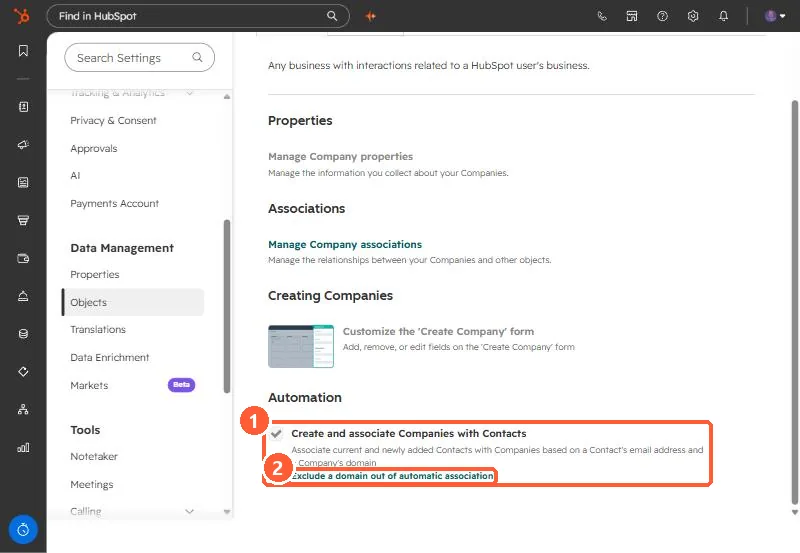
The text says it associates current and newly added contacts with companies based on a contact's email address and a company's domain. HubSpot's example: sandra@example.com is associated with the company whose domain is example.com.
2. When it does not happen
- The contact has a free email domain (gmail.com, hotmail.com) and no Website URL.
- The domain is on the exclusion list, in most scenarios.
- One exception: if a form submission includes company properties, the contact is associated with that company whatever these settings say.
3. Exclude a domain
Click Exclude a domain out of automatic association. The dialog says contacts from the listed domains will not automatically be associated with these companies.
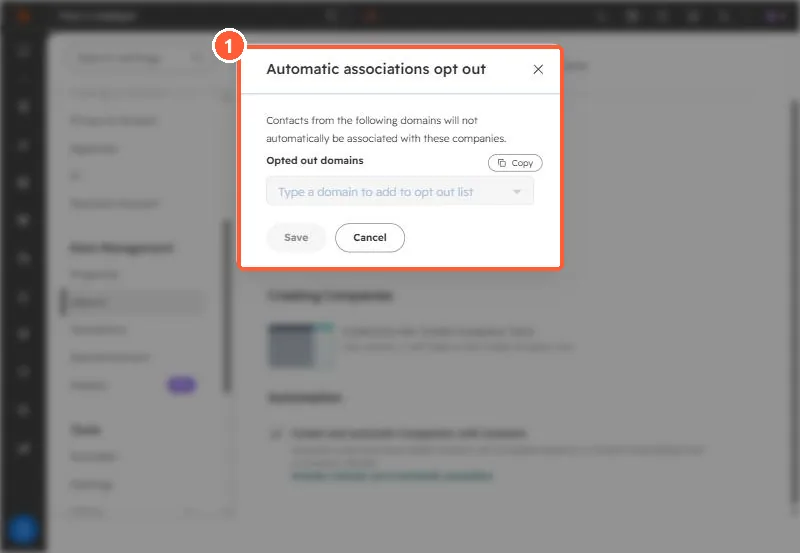
Good candidates are your own domain, agencies, resellers, and shared mailbox providers. If companies are already duplicated, see duplicate companies from connector IDs.