Short answer
Open Settings, Integrations, Connected Apps. The Needs attention section lists apps that are disconnected, expired, or have errors, with a Reconnect or Review option. My demo shows 3 apps with expired connections from 2 months ago. The Notifications tab lets you get email or in-app alerts when an app is installed, disconnected, or uninstalled.
1. Connections home
Open Connected Apps. Installer details are blurred below.
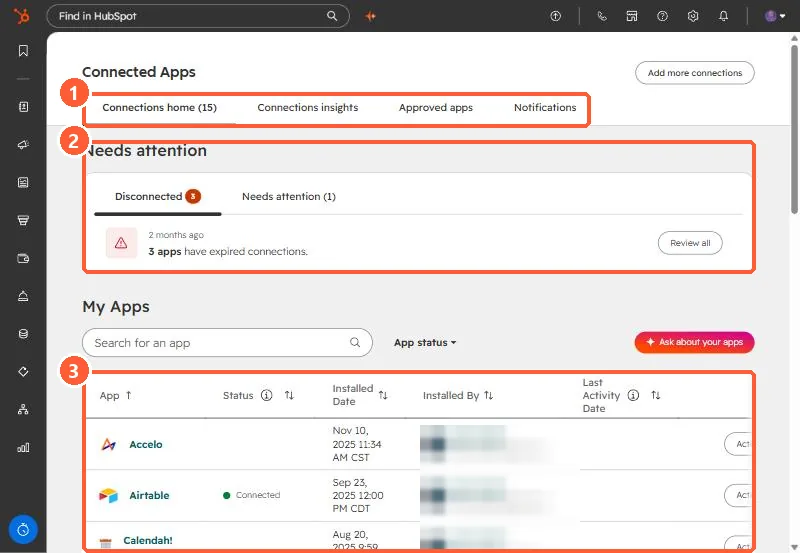
- Tabs: Connections home (15 apps here), Connections insights, Approved apps, and Notifications.
- Needs attention: Disconnected (3) and Needs attention (1) in my demo.
- My Apps: each app's status, installed date, who installed it, and last activity.
2. What to do with it
- Reconnect apps you rely on, using Reconnect or Review all.
- Uninstall apps nobody uses.
- Connections insights shows API usage and which records an app created, updated, or deleted. Useful when an app is creating duplicates, see scripts that create duplicates.