Quick tipHow toMarketing Hub

Set a custom return-path for email bounces

Strict DMARC needs a subdomain sending domain.

Subscription
Marketing email with a connected sending domain
Permissions
Domain settings access
Time
3 min · Advanced
Last verified

Short answer

HubSpot's KB: after connecting a sending domain, add a custom return-path so bounces use your domain. With strict DMARC alignment it only works if you send from a subdomain; relaxed alignment needs only the root domain to match. DNS verification can take up to 48 hours.

1. In HubSpot

The relevant screen in my demo portal.
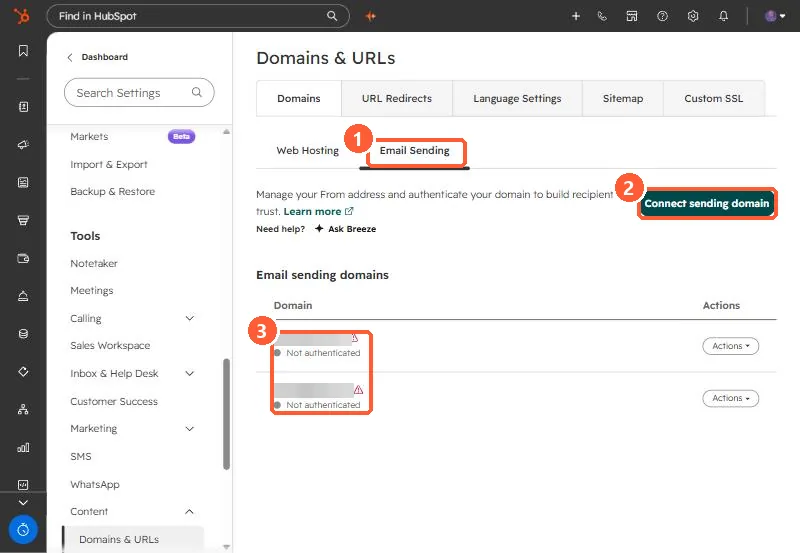
Domains and URLs Email Sending tab with Connect sending domain button and two domains not authenticated
Email Sending (1), Connect sending domain (2), and the status (3).

2. Worth knowing

Until verified, HubSpot's default return-path is used.

3. Related

DMARC, SPF and DKIM.

Sources

New field notes by email

One email when a new article publishes.

Still stuck?

If this did not fix it, the problem is probably specific to your setup. Book a call and we will look at it together.

Book a call with Sam