Short answer
When you type a property label, HubSpot generates the internal name from it. In my demo, the label June 6 Workshop Date became june_6_workshop_date. HubSpot says you cannot edit a property's internal name after creation. A healthcare practice had properties named for a June 6 workshop when it moved to June 13. The label could be renamed, but the internal names, which workflows, imports, and integrations use, would keep saying June 6. The advice was to delete and recreate them with names that describe the role, such as Next workshop date.
1. Where the internal name comes from
In properties, start creating a property and click the code icon next to the label to see the internal name.
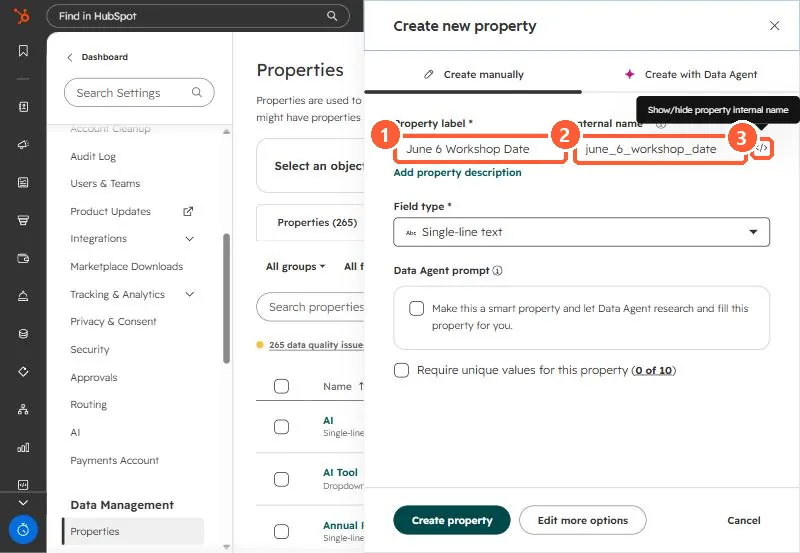
HubSpot's create and edit article says you cannot edit a property's object type or internal name after creation.
2. What went wrong
The practice's workshop properties were named for June 6. When the workshop moved to June 13, renaming the label would have fixed what users see, but the internal names still said June 6, and those are what workflows, imports, and API calls use. We advised deleting and recreating them with current names.
3. Name for the role
- Next workshop date, not June 6 workshop date.
- Workshop session, not Spring 2026 session.
- If you must include a date, edit the internal name before you click Create.
The reminder workflow that uses this property is in event reminders on a date property. Option values have the same issue, see dropdown labels vs internal names.