Short answer
In Settings, Objects, Deals, the Default Deal amount decides how the Amount is calculated when line items are on a deal. HubSpot's options are Total contract value (TCV), Annual contract value (ACV), Annual recurring revenue (ARR), Monthly recurring revenue (MRR), and Manual entry. My demo uses ACV. Below it, Apply default close date to new Deals sets the close date to the end of a period (this month, in my demo) or a time after creation.
1. The Deals setup page
Open Deals settings. The Setup tab is a short list of defaults.
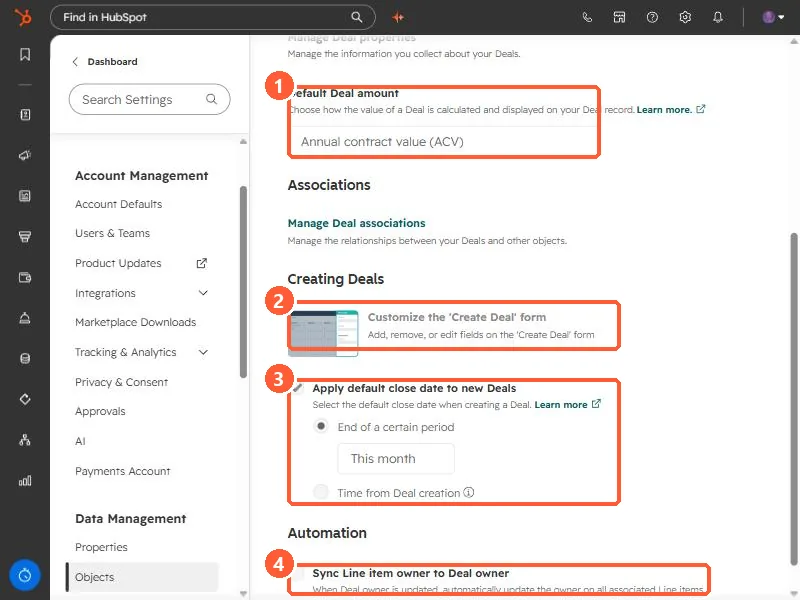
2. Default deal amount
HubSpot's definitions:
- TCV: the total value from the deal's line items, including recurring and one-time charges.
- ACV: the value of the deal over a 12-month period.
- ARR: annual revenue from recurring line items and their term. With no term, HubSpot assumes 12 months.
- MRR: monthly revenue from recurring line items.
- Manual entry: adding or removing line items does not change the Amount. Reps update it by hand.
HubSpot notes that TCV, ARR, and MRR do not take into account a value typed into Amount. If your reps type amounts and also add line items, decide which one wins before you change this.
3. Default close date
Apply default close date to new Deals is ticked in my demo, set to End of a certain period, This month. The other choice is Time from Deal creation. A default close date keeps new deals out of the "no close date" bucket in forecasts, but it is a placeholder. For what happens to it when a deal closes, see why the close date changes when a deal is won.
4. The create form and line item owners
- Customize the 'Create Deal' form sets which fields reps see when they create a deal.
- Sync Line item owner to Deal owner, under Automation, updates the owner on all associated line items when the deal owner changes. It is off in my demo.