Quick tipHow toSmart CRM

Delete contacts with a workflow, and get them back

Deleted by a workflow, restorable for 90 days.

Subscription
Professional or Enterprise (Marketing, Sales, Service or Data Hub)
Permissions
Workflows access
Time
3 min · Intermediate
Last verified

Short answer

HubSpot's KB: Delete contact automatically deletes enrolled contacts, for example inactive contacts in bulk. Contacts can be restored within 90 days, and the restore tool can filter by the workflow that deleted them. Turn off that workflow first so restored contacts aren't deleted again.

1. Restore

Restore options on the contacts index in my demo portal.
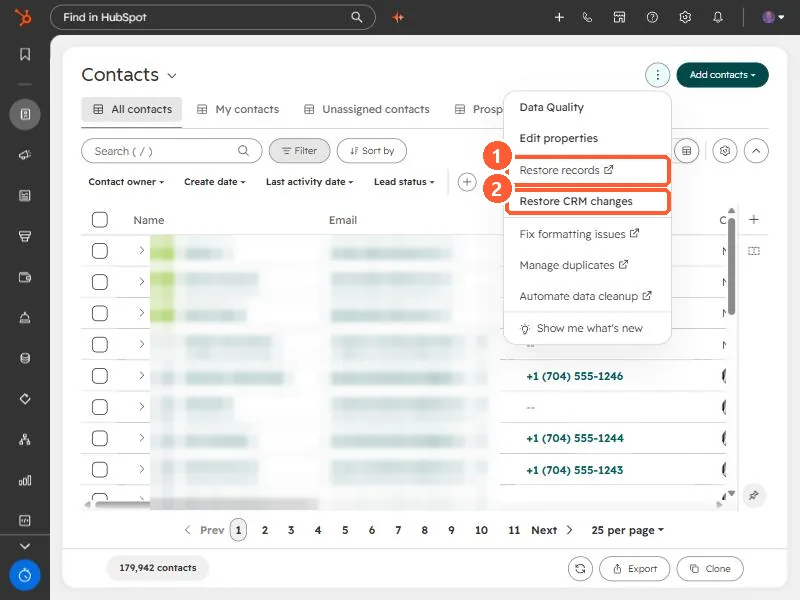
Contacts index actions menu with Restore records and Restore CRM changes
Restore records (1) and Restore CRM changes (2).

2. Permanent deletes

GDPR deletions don't go to the recycle bin. See GDPR delete.

3. Related

Deleting inactive contacts.

Sources

New field notes by email

One email when a new article publishes.

Still stuck?

If this did not fix it, the problem is probably specific to your setup. Book a call and we will look at it together.

Book a call with Sam