Short answer
Search companies, contacts, and deals for words like test and demo, review every row, then delete from the bulk More menu. In my demo the search returns 17 companies, and one of them is a real business with Testing in its name, so do not delete a search result blindly. HubSpot lets you restore deleted contacts, companies, and other records for 90 days. On an IT services client the test companies and deals also existed in the system that syncs to HubSpot, so the client removed them there too.
1. Search, then read
Search the Companies index for "test". Owner emails are blurred below.
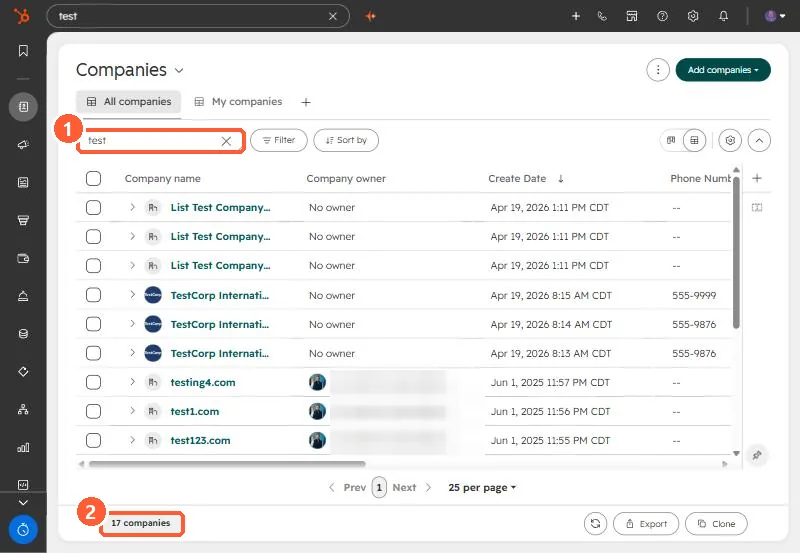
In my demo the 17 results include List Test companies from a script, three TestCorp International records, domains like test1.com, and Dynamic Non-Destructive Testing, which is a real company name. Search also matches domains, not just names.
2. Delete in bulk
Select the rows you are sure about, then open More.
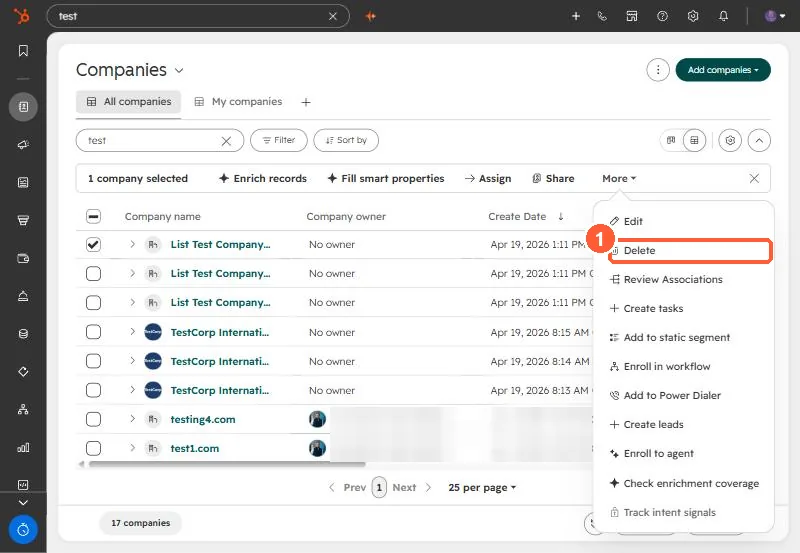
HubSpot keeps deleted records restorable for 90 days from Actions, Restore records on the index.
3. Clean the source too
On an IT services client, removing test companies and test deals took wrong numbers out of every count. The same test accounts existed in their service management system, which syncs to HubSpot, so the client deactivated them there. Otherwise the sync can bring them back.
Next on that list: bounced contacts still marketable.