Quick tipHow toSales Hub

DocuSign with HubSpot: what it does and doesn't sync

It fills envelopes from HubSpot. It isn't a two-way data sync.

Subscription
Paid DocuSign plan; workflows need Professional
Permissions
Super Admin or App Marketplace
Time
3 min · Intermediate
Last verified

Short answer

HubSpot's KB: you need a paid DocuSign plan. DocuSign is a user-level app, so each user connects their own DocuSign user. In settings you add an HMAC security key and map fields so envelopes use contact, company and deal properties. It's not a data sync app that syncs full records to DocuSign.

1. Connected apps

Connected apps in my demo portal.
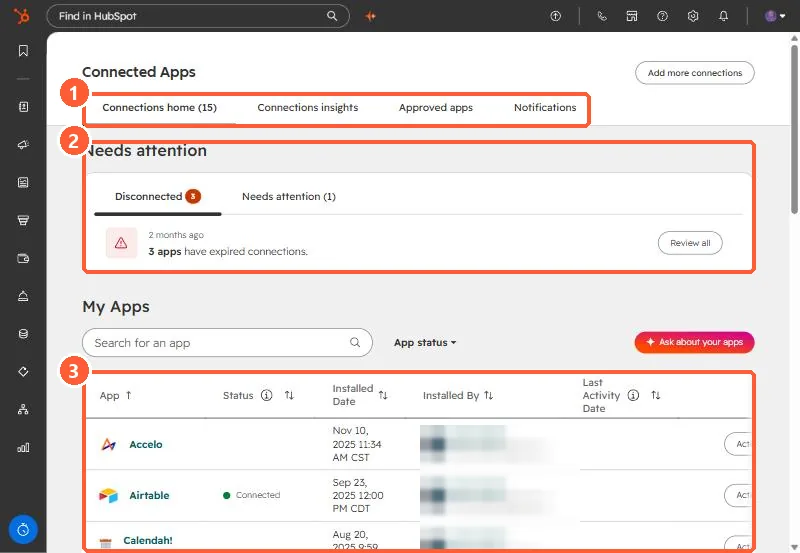
Connected Apps page with the tabs, the Needs attention section, and the My Apps table highlighted
Tabs (1), Needs attention (2), and My Apps (3).

2. Quotes

HubSpot quotes have their own e-signature. See quotes.

3. Related

Sales documents.

Sources

New field notes by email

One email when a new article publishes.

Still stuck?

If this did not fix it, the problem is probably specific to your setup. Book a call and we will look at it together.

Book a call with Sam