Quick tipHow toSales Hub

Images and formatting in your HubSpot email signature

Use the HTML editor for exact control.

Subscription
Multiple signatures need Sales Hub Professional or Enterprise
Permissions
Your own user
Time
3 min · Beginner
Last verified

Short answer

HubSpot's KB: the Simple editor can insert a link or image, or click HTML to edit the code. You can set a font with the face attribute, but many fonts aren't supported across email clients. Managing multiple signatures needs Sales Hub Professional or Enterprise and a Sales seat.

1. The editor

Signature settings in my demo portal.
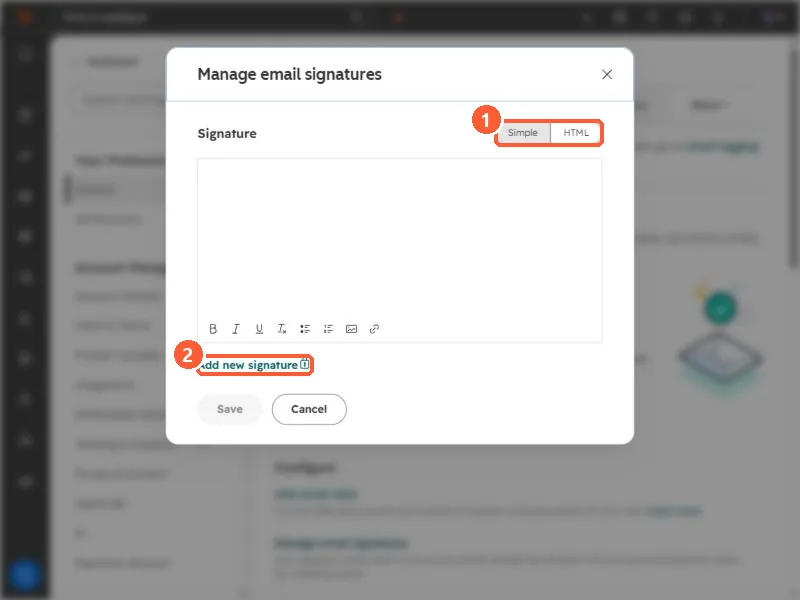
Manage email signatures dialog with the Simple and HTML toggle and Add new signature highlighted
Simple or HTML editor (1) and Add new signature (2).

2. Sharp images

In HTML, set the image width you want displayed so clients don't rescale it unpredictably.

3. Related

Inbox, alias and signature.

Sources

New field notes by email

One email when a new article publishes.

Still stuck?

If this did not fix it, the problem is probably specific to your setup. Book a call and we will look at it together.

Book a call with Sam