Quick tipHow toSmart CRM

Export companies with their associated contacts

Associations come out as extra columns in the export file.

Subscription
All tiers
Permissions
Export permissions
Time
3 min · Beginner
Last verified

Short answer

Exports include associations as columns: each associated object gets its own column. HubSpot's KB says the default is up to 1,000 associated record IDs per association column plus the associated record name; CSV exports can include all associated records. Choose between properties and associations in your view, all properties (no associations), or all properties and associations. Export permissions are required.

1. The export dialog

Exporting all companies in my demo portal: 4,624 rows in 1 file. I closed it without exporting.
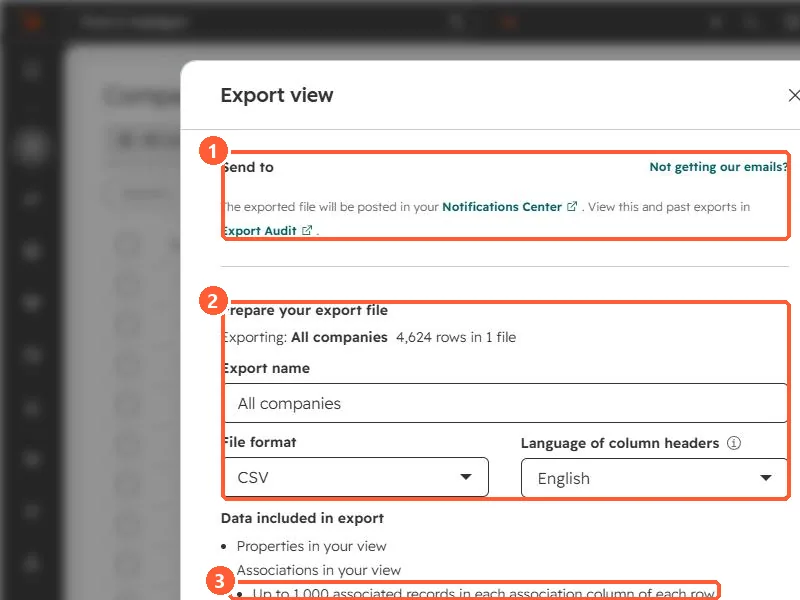
Export view dialog showing where the file is sent, export name, file format and the associations included
Where the file goes (1), the file settings (2), and the association limit (3).

2. Tips

  • Clearing Include associated record name makes exports faster.
  • XLS files cap columns at 256; use CSV or XLSX for wide exports.

3. Related

Exporting from a view.

Sources

New field notes by email

One email when a new article publishes.

Still stuck?

If this did not fix it, the problem is probably specific to your setup. Book a call and we will look at it together.

Book a call with Sam