Quick tipHidden trickSmart CRMMarketing Hub

Find when a contact submitted a form: conversion date properties

You don't need a custom "form submitted on" property. HubSpot keeps one.

Subscription
All tiers
Permissions
Any user
Time
2 min · Beginner
Last verified

Short answer

HubSpot sets First conversion and First conversion date (the first form submitted) and Recent conversion and Recent conversion date (the latest) automatically. Companies have matching properties based on any associated contact. In my demo portal the date properties are date and time pickers.

1. The properties

Contact properties in my demo portal, searched for conversion date.
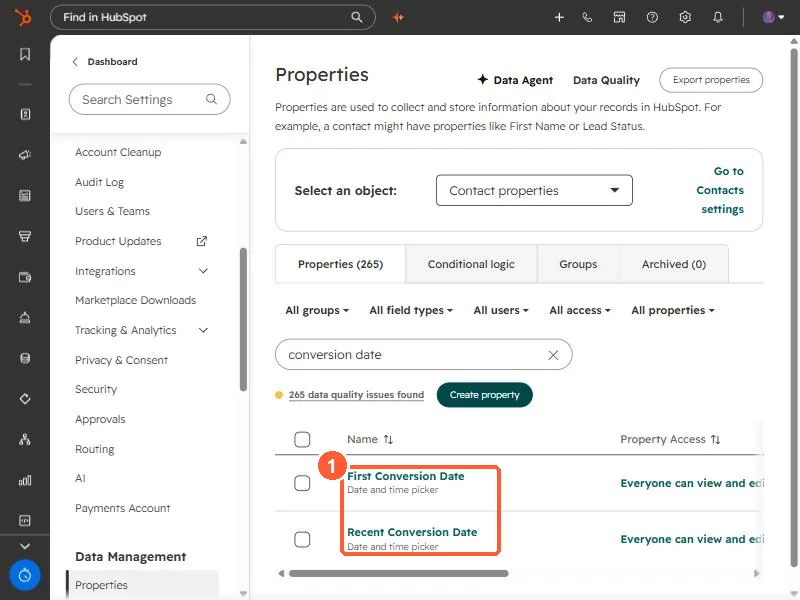
Contact properties filtered to conversion date showing First Conversion Date and Recent Conversion Date
The conversion date properties (1).

2. Use them

  • Recent conversion date in the last 7 days: fresh leads view.
  • First conversion: which form brought them in.

3. Related

Lifecycle date properties.

Sources

New field notes by email

One email when a new article publishes.

Still stuck?

If this did not fix it, the problem is probably specific to your setup. Book a call and we will look at it together.

Book a call with Sam