Short answer
HubSpot forms offer three consent patterns: implicit processing consent with individual checkboxes for each communication type, separate consents where the person must also explicitly consent to data processing, and legitimate interest, which shows a notice instead of asking. For a newsletter, the first pattern is common: one required checkbox that names the subscription, plus a short processing notice. That is how this site's newsletter form is set up. Legal basis is your decision, so check what your jurisdiction requires.
1. The three options
- Implicit processing consent and individual checkboxes for communications. Consent to communicate is an affirmative checkbox that names the subscription type. You can add several. Consent to process the data is implied when the person clicks submit.
- Separate consents. The person must tick a checkbox for data processing, and the form will not accept the submission without it.
- Legitimate interest. The form shows a notice that you need their information to contact them about your products and services, and that they can unsubscribe. They are not asked to consent.
2. What the newsletter form looks like
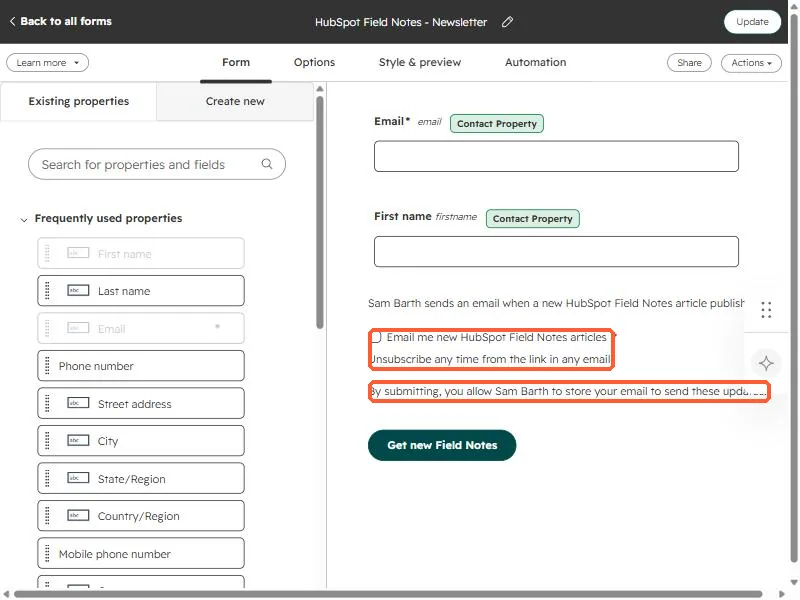
The newsletter form on this site asks for an email and first name, then shows a required checkbox for the subscription, a one-line reminder that they can unsubscribe, and a short notice that submitting lets the sender store the email to send updates. It has a single clear submit button.
3. Write good checkbox text
- Name the exact thing: "Email me new field notes articles" says what will happen.
- Mark it required when you need the consent to send the email.
- Keep the unsubscribe reminder next to it.
- Check the box is unticked by default.
Which legal basis applies depends on where your contacts live and what you send. Decide that with whoever advises you, then configure the form to match. HubSpot can also record the legal basis on the contact.