Short answer
HubSpot's developer docs describe global modules as content used across multiple pages; editing one updates it everywhere it is used. In a page editor, select it and choose Edit global module. For one page that needs something different, make a local copy. Global modules support smart content, but modules inside global groups do not, and HubSpot advises against putting global modules inside global partials.
1. Design Manager
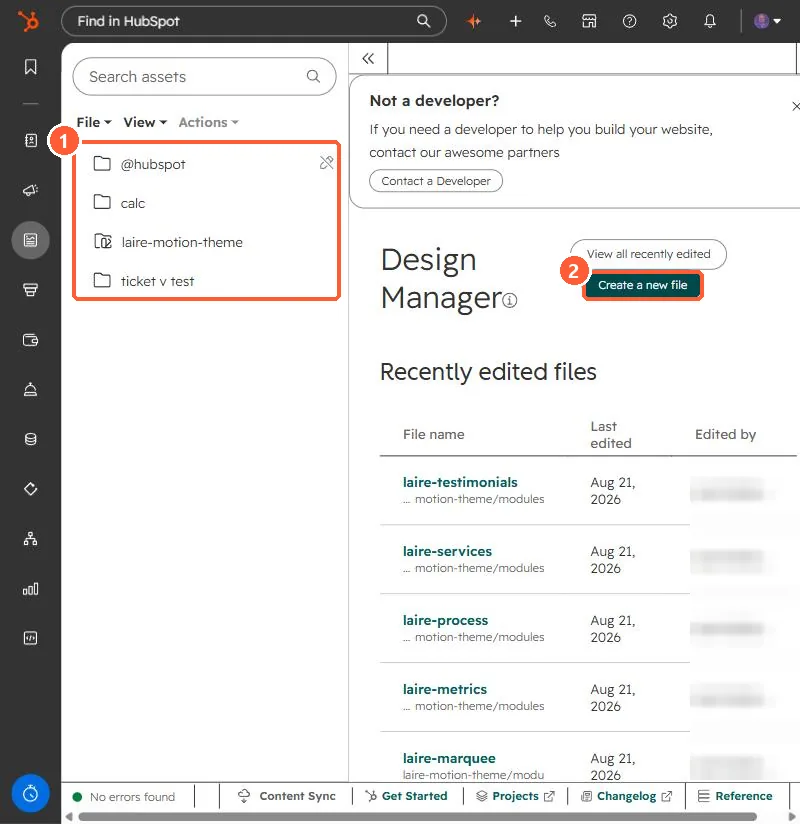
Global modules and partials live in your theme in Design Manager. My demo portal's file tree and recent files:
2. Before editing
- Know how many pages use it. A typo in a global header is on every page.
- Use a local copy only when a page truly needs to differ.
3. Related
Theme system templates and moving template copy into editable areas.