Quick tipDeveloperSmart CRM

HubSpot MCP: built-in AI connectors vs your own MCP connector

Most teams just enable the connector for the AI tool they already use. Builders create their own.

Subscription
Check availability in your account
Permissions
Developer access to create connectors
Time
4 min · Intermediate
Last verified

Short answer

HubSpot's developer docs say its connectors for Claude, ChatGPT, Microsoft Copilot and Gemini are built on the remote HubSpot MCP server, so users of those tools need no custom setup. The remote server is for builders adding HubSpot data to their own agents or AI tools. In Development > MCP Connectors, creating a connector gives you a client ID and secret, preconfigured scopes and a redirect URL flow.

1. The page

My demo portal has no MCP connectors yet.
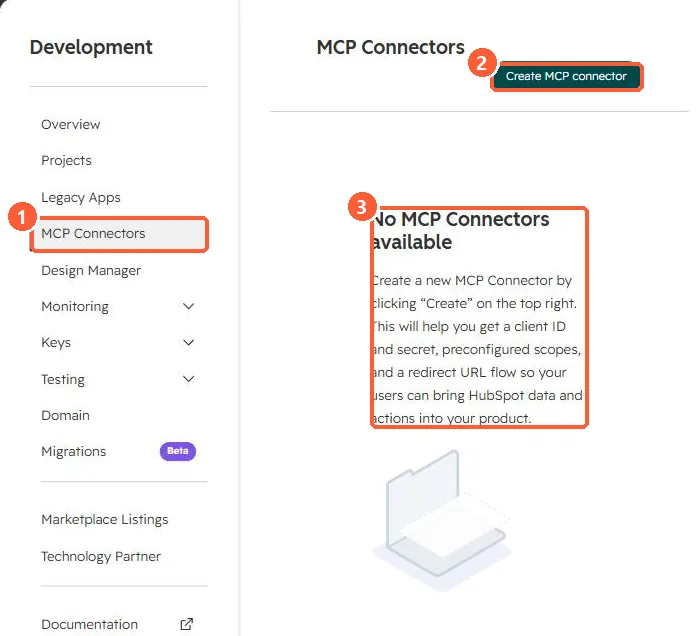
MCP Connectors page with Create MCP connector button and a description of client ID, secret, scopes and redirect URL
MCP Connectors (1), Create (2), and what it provides (3).

2. Which path

  • Using Claude, ChatGPT, Copilot or Gemini: built-in connector.
  • Your own product or agent: an MCP connector on the remote server.

3. Related

Agent Hub context and API limits.

Sources

New field notes by email

One email when a new article publishes.

Still stuck?

If this did not fix it, the problem is probably specific to your setup. Book a call and we will look at it together.

Book a call with Sam