Short answer
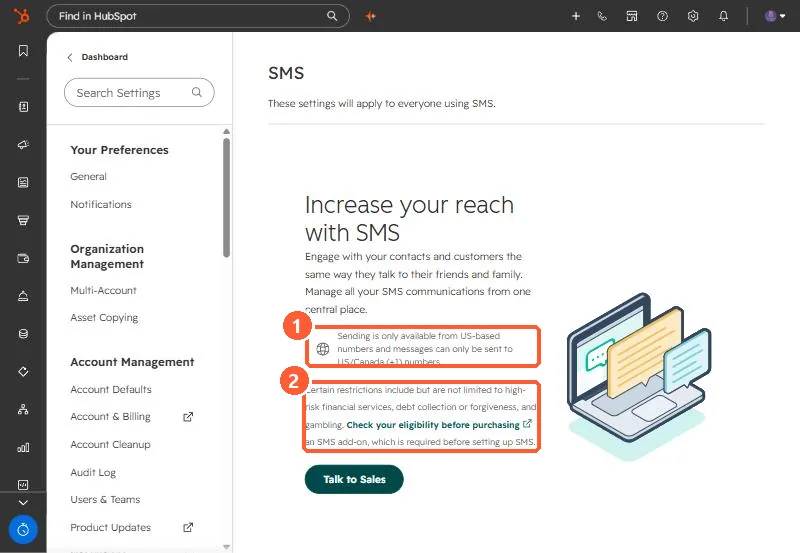
To send marketing SMS from HubSpot you need the Marketing SMS Add-On, a registered and approved US number, and recipients who are marketing contacts, have given explicit SMS consent, are opted into the message's subscription type, and have a +1 number with 11 digits in Mobile phone number or Phone number. Sending is only from US numbers to US and Canada numbers. HubSpot says SMS is not supported for sole proprietors, and some business categories are restricted.
1. The settings page without the add-on
In my demo portal, Settings > SMS shows the requirements up front and a Talk to Sales button.
2. Account requirements
- Marketing SMS Add-On or Marketing SMS Short Code Add-On.
- One generated number per account for marketing SMS, registered and approved.
- Not available to sole proprietors. Check the forbidden message categories of HubSpot's SMS provider first. The page names high-risk financial services, debt collection or forgiveness, and gambling among them.
3. Contact requirements
- Marketing contact, explicit SMS consent, and opted into the SMS subscription type.
- A US number that starts with +1 and has 11 digits, in Mobile phone number or Phone number. Mobile wins if both are set.
Phone formatting is usually the biggest cleanup job. Logging SMS from another tool is a different thing: see logging an SMS with the API.