Quick tipHow toMarketing Hub

Import an opt-out list so old unsubscribes stay unsubscribed

Bring your old tool's unsubscribe and bounce list over before your first send.

Subscription
All tiers
Permissions
Import access
Time
3 min · Beginner
Last verified

Short answer

HubSpot's KB recommends importing contacts who hard bounced or unsubscribed in a previous tool as opted out, to protect your sending reputation. You confirm the import by typing the number of contacts. It also notes that to keep these contacts out of your billable total, you can delete them and re-import their email addresses as opted out.

1. Start from Data integration

Imports start from Data integration in my demo portal.
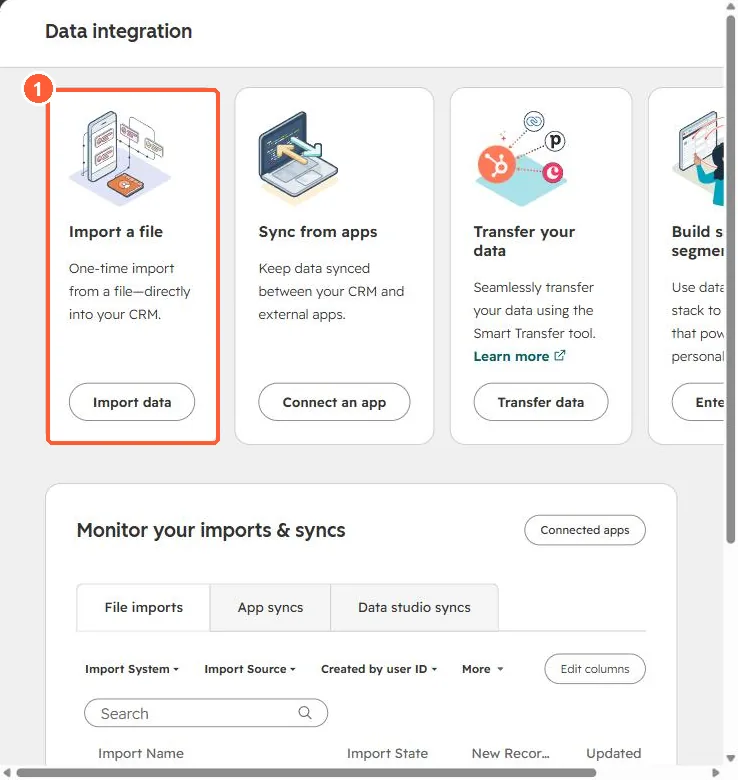
Data integration page with Import a file, Sync from apps and Transfer your data cards
Import a file (1).

2. Why before the first send

Mailing old unsubscribes from a new system is a common cause of spam complaints. See the deliverability checklist.

3. Related

Migration planning.

Sources

New field notes by email

One email when a new article publishes.

Still stuck?

If this did not fix it, the problem is probably specific to your setup. Book a call and we will look at it together.

Book a call with Sam