Short answer
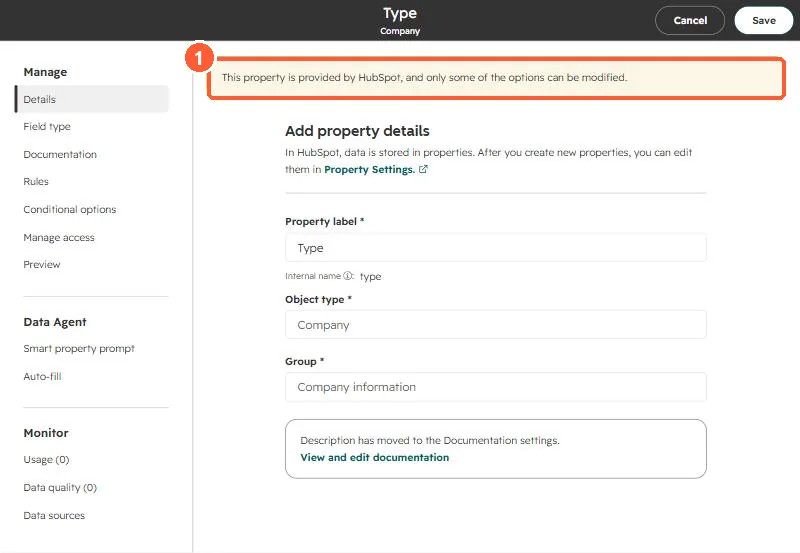
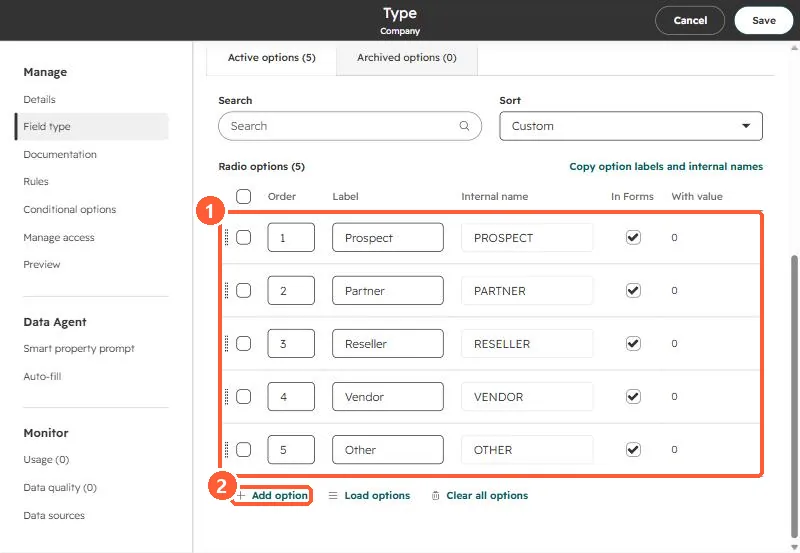
Companies have a default Type property with five options: Prospect, Partner, Reseller, Vendor, and Other. HubSpot marks it as a HubSpot-provided property where only some options can be modified, and in my demo its options are editable. In my own portal I wanted agencies and end businesses clearly separated for prospecting and personalization. Later I decided to keep agency employees and recruiters in the pool, because agencies can hand off HubSpot work and recruiters refer it, but they still get different messages. A label is what makes that split possible in views and segments.
1. Why bother
My prospect list held businesses that use HubSpot, agencies that sell HubSpot work, and recruiters. An agency employee and an end business need different emails, and personalization tokens break when you cannot tell them apart. I kept agencies and recruiters on the list on purpose, so the answer was a label, not a deletion.
2. The default Type property
Open company properties and find Type.
3. Extend it or add your own
- If nobody uses Type yet, add options such as Agency and End business.
- If Type already means something in your reports, create a separate dropdown property instead.
- Keep the option list short. A label nobody fills in does not help.
Then use it in views and segments. For removing customers from a prospect list, see separate customers from prospect lists.