Short answer
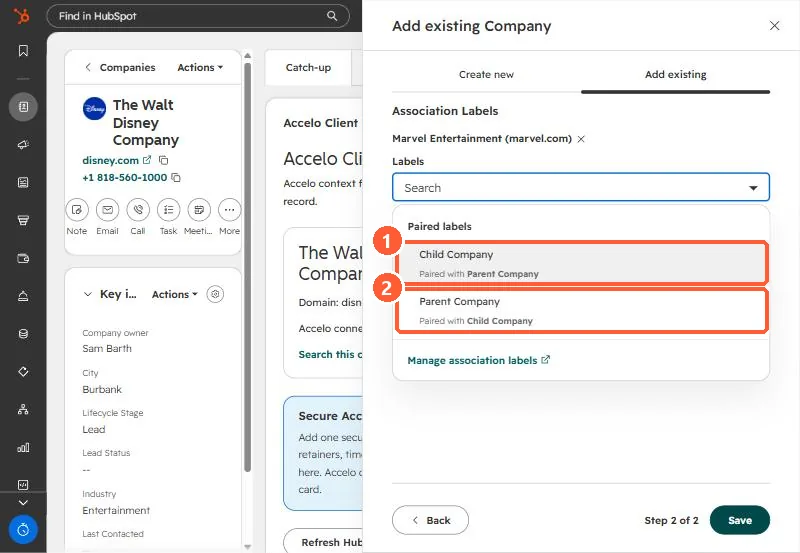
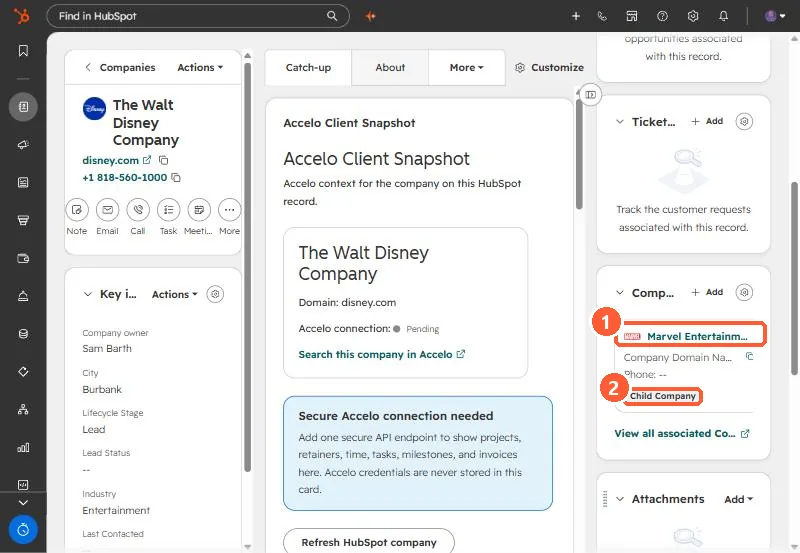
Open the parent company, click Add on the Companies card, pick the other company, and choose the Child Company label. The labels come as a pair: Child Company is paired with Parent Company. HubSpot says a parent can have many children but a child can only have one parent. For bulk, import the children with the parent's domain or Record ID mapped as an association with the Parent Company label. For an industrial client I set a newly added brand as the child of its parent group.
1. The case
An industrial client's parent group owns several brands, and each brand buys separately. When a new brand came in, I created its company with the right domain and owner and set it as a child of the parent, so the brand's deals stay on the brand and the group view still shows everything.
2. Set it on the record
Open the parent in Companies, click Add on the Companies card, select the company, then add an association label. In my demo, The Walt Disney Company is the parent and Marvel Entertainment the child.
3. Rules
- A parent can have many children. A child can have only one parent.
- The label is relative to the record you start from: on the parent, choose Child Company for the company you add.
- For bulk, import child companies with a column for the parent's Company domain name or Record ID, mapped as an association with the Parent Company label.
More on labels in general: association labels.