Quick tipGotchaMarketing Hub

What the HubSpot tracking code collects

Website activity, IP addresses and other online identifiers.

Subscription
All tiers
Permissions
Super Admin to change the data-sharing setting
Time
2 min · Beginner
Last verified

Short answer

HubSpot's KB: the tracking code collects visitor data such as website activity, IP addresses and other online identifiers, used for things like traffic reporting. Depending on account settings and visitor consent, HubSpot also uses some of it to improve its products. A Super Admin can turn off intent data access, after which HubSpot won't use tracking-code data for that purpose.

1. In HubSpot

The relevant screen in my demo portal.
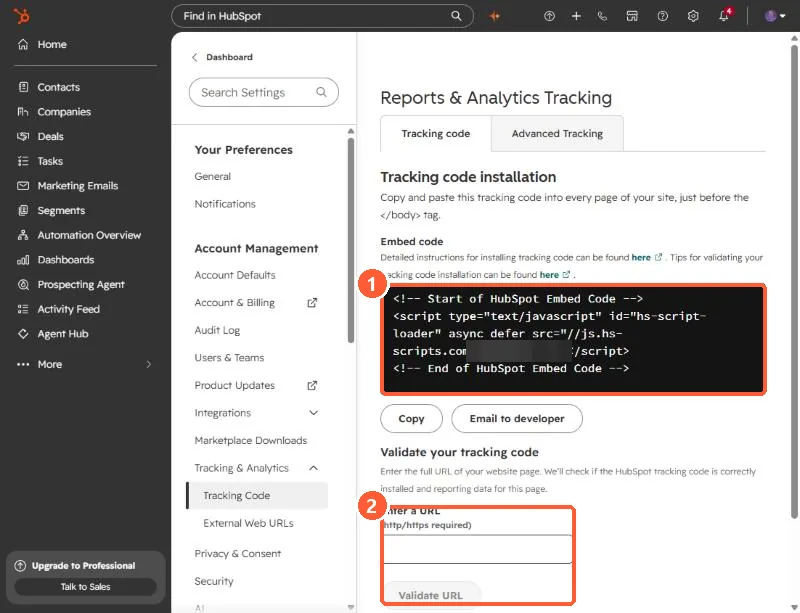
Tracking & Analytics settings Tracking code tab showing the embed code and the Validate your tracking code section highlighted
The embed code (1) and the Validate your tracking code box (2). The Hub ID is blurred.

2. Worth knowing

Turning off the sharing setting doesn't stop the tracking code collecting data for your own analytics. Consent banner choices are what control that per visitor.

3. Related

Check the tracking code is installed.

Sources

New field notes by email

One email when a new article publishes.

Still stuck?

If this did not fix it, the problem is probably specific to your setup. Book a call and we will look at it together.

Book a call with Sam