Quick tipHow toMarketing HubSales Hub

Remove a group of contacts from a workflow

A suppression segment is the cleanest bulk exit.

Subscription
Professional or Enterprise (Marketing, Sales, Service or Data Hub)
Permissions
Workflows access
Time
3 min · Intermediate
Last verified

Short answer

HubSpot's KB: in contact-based workflows, use suppression segments, goals or settings to unenroll contacts. Contacts added to a suppression segment are unenrolled and won't enroll while in it. If they're removed from the segment, they don't automatically enroll, even if they meet the triggers. Other workflow types use unenrollment triggers.

1. Triggers

Workflow triggers in my demo portal.
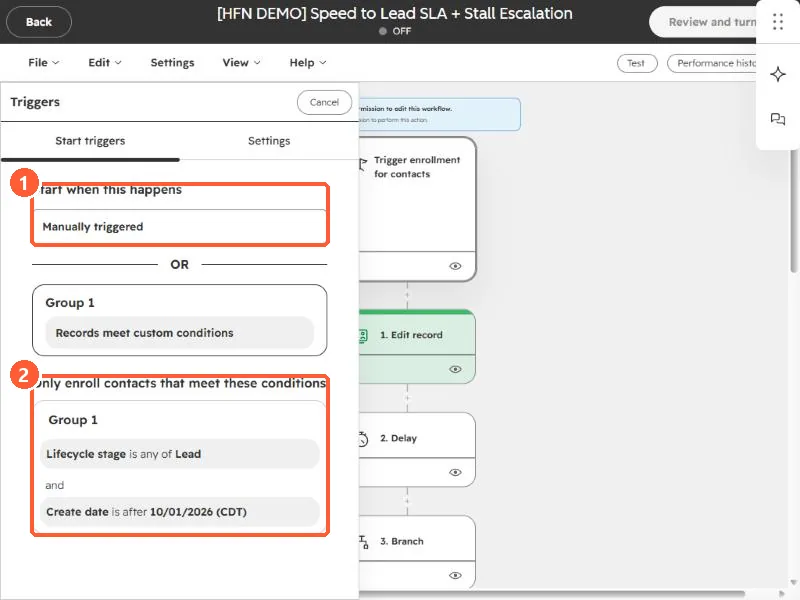
Workflow trigger panel showing the Start when this happens section and the Only enroll contacts that meet these conditions section highlighted
What starts enrollment (1) and the conditions a record must meet (2).

2. Re-enrollment

See why a workflow won't re-enroll.

3. Related

Troubleshooting enrollment.

Sources

New field notes by email

One email when a new article publishes.

Still stuck?

If this did not fix it, the problem is probably specific to your setup. Book a call and we will look at it together.

Book a call with Sam