Short answer
A trigger answers two questions. Start when this happens is the event or criteria that starts enrollment, such as a form submission or a manual enrollment. Only enroll records that meet these conditions is the filter a record must also pass. An event trigger only enrolls records after the workflow is on, and the record has to exist before the event. By default a record enrolls once. Manually enrolled records do not need to meet the conditions.
1. The trigger panel
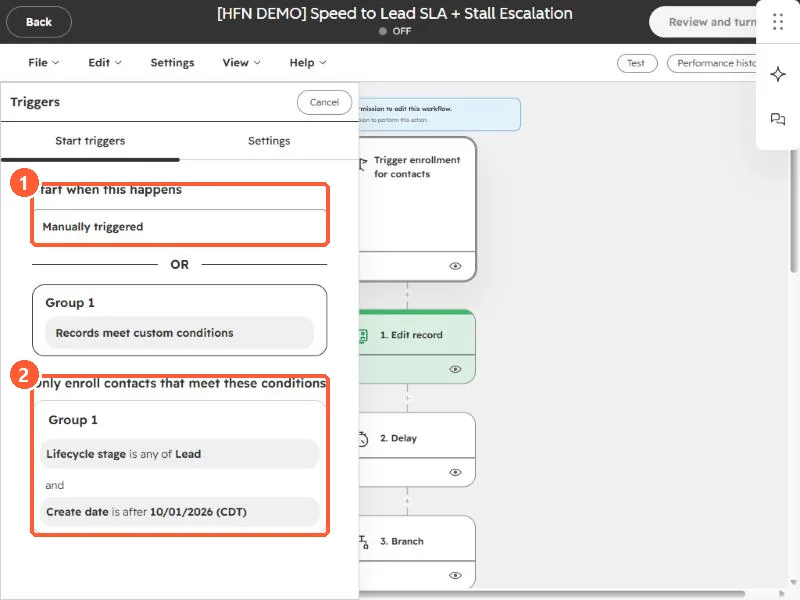
Open a workflow from Workflows and click the trigger card at the top. The panel has two tabs: Start triggers and Settings. In my demo, the start trigger is manual, plus a group of custom conditions, and below it are the filters a record must meet.
2. Start when this happens
HubSpot describes the two kinds of trigger. When an event occurs, records enroll as the event happens, for example a form submission. When filter criteria are met, records enroll when a condition becomes true, for example a city that equals a value. There are also schedule-based triggers and manual enrollment.
HubSpot says the record must exist before the event, and existing records cannot be enrolled for an event that already happened. Only records that meet the event criteria after the workflow is turned on will enroll.
3. Only enroll records that meet these conditions
This second layer is where you add filters, grouped with AND and OR. My demo trigger asks for a lifecycle stage of Lead and a create date after a chosen day. A record must pass these as well as the trigger above them.
The create date condition is worth copying. It keeps a new workflow from enrolling every old record the moment you turn it on.
4. Manual enrollment and re-enrollment
- By default, a record enrolls the first time it meets the triggers, or when you enroll it manually.
- Manually enrolled records do not have to meet the triggers.
- Re-enrollment is controlled on the trigger's Settings tab. See why a contact won't re-enroll and troubleshoot enrollment.