Quick tipHow toSmart CRM

Breeze Assistant: what to ask HubSpot's built-in AI

Breeze Assistant opens from the top bar and works with the record you are on.

Subscription
All products and plans; some features need credits
Permissions
Any user with AI access
Time
3 min · Beginner
Last verified

Short answer

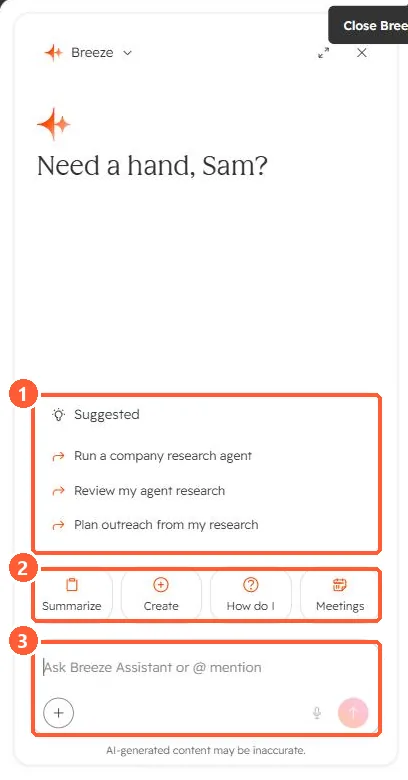
HubSpot's KB describes Breeze Assistant as its conversational AI for generating content, summarizing records, preparing for meetings and completing tasks. In my demo portal the panel offers Summarize, Create, How do I and Meetings, plus suggested prompts and an @mention box. Projects keep context and reference material, and also carry over to the mobile app.

1. The panel

My demo portal, panel open.
Breeze Assistant panel with suggested prompts, Summarize, Create, How do I and Meetings actions, and a prompt box
Suggestions (1), quick actions (2), and the prompt box (3).

2. Control what it can see

See AI access settings and AI context.

3. Related

Agent Inbox.

Sources

New field notes by email

One email when a new article publishes.

Still stuck?

If this did not fix it, the problem is probably specific to your setup. Book a call and we will look at it together.

Book a call with Sam