Quick tipHow toSmart CRM

Delete contacts in bulk, and the permission it needs

Bulk delete is a permission, separate from editing records.

Subscription
All tiers
Permissions
Bulk delete permission
Time
3 min · Beginner
Last verified

Short answer

Select records in a view and choose Delete from the bulk actions. HubSpot's permissions guide says deleting records in bulk from an index page needs bulk delete permissions. Normal deletes can be restored for 90 days; permanent and GDPR deletions cannot.

1. The bulk menu

With a contact selected in my demo portal, Delete is in the More menu. I didn't delete anything.
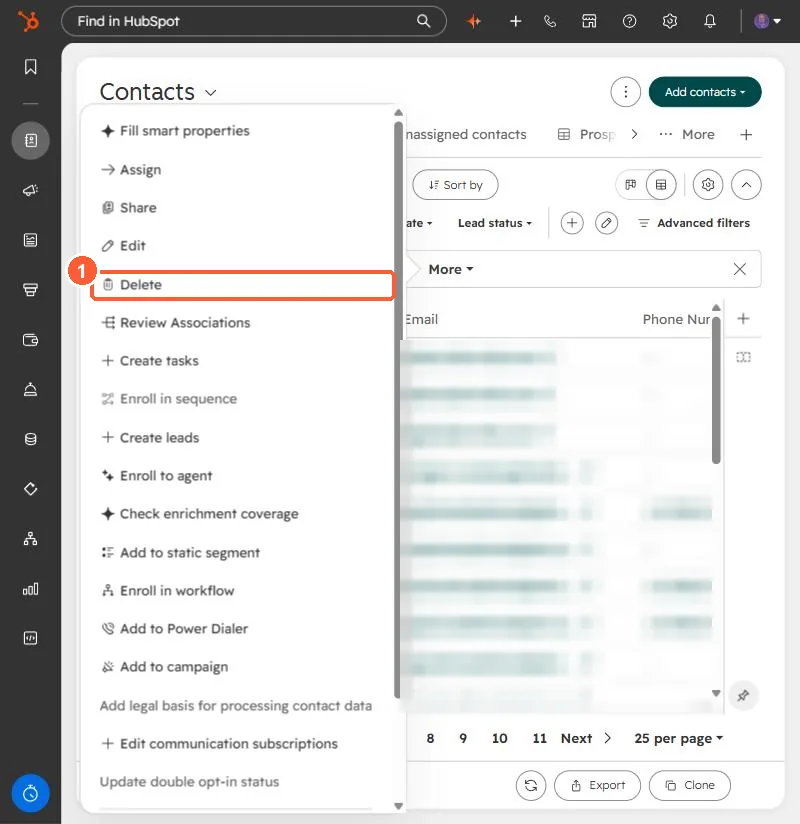
Contacts bulk actions menu with Delete
Delete (1).

2. Before you delete

  • Export the view first as a backup.
  • Inactive contacts can be cleaned up automatically instead. See inactive contacts.

3. Related

Restoring deleted records.

Sources

New field notes by email

One email when a new article publishes.

Still stuck?

If this did not fix it, the problem is probably specific to your setup. Book a call and we will look at it together.

Book a call with Sam