Quick tipFix itSmart CRM

Restore deleted contacts, companies and deals within 90 days

Deleted records sit in a recycle bin for 90 days. Permanent and GDPR deletions do not.

Subscription
All tiers
Permissions
Account access and Add and edit users permissions
Time
4 min · Beginner
Last verified

Short answer

From an object's index page, open the actions menu and choose Restore records. HubSpot's KB says you can restore records up to 90 days after deletion, filtering by date, user, or the workflow that deleted them, and up to 10,000 records show at a time. A contact cannot be restored if an active contact already uses its email. Permanent and GDPR deletions are not held for restore.

1. The menu

The contacts actions menu in my demo portal, which also has Restore CRM changes.
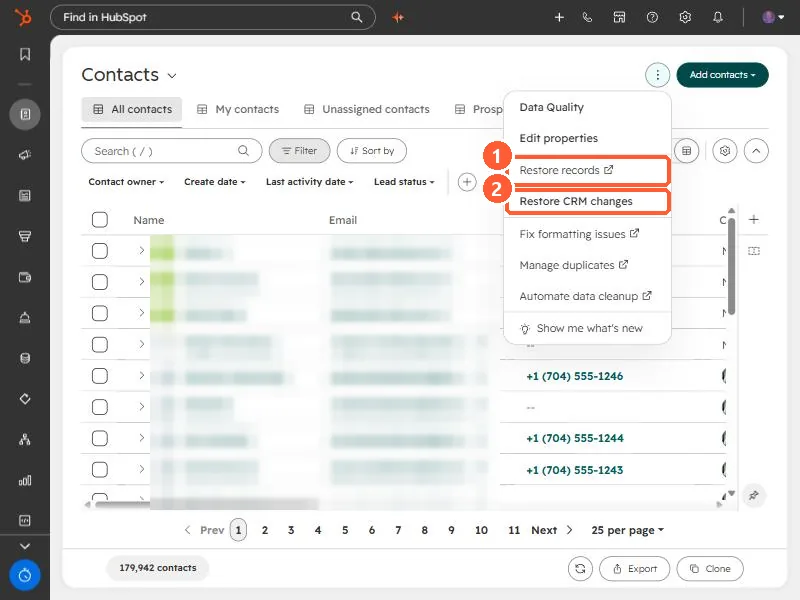
Contacts index actions menu with Restore records and Restore CRM changes
Restore records (1) and Restore CRM changes (2).

2. After a workflow deleted them

Turn the workflow off first, or the restored records can be deleted again.

3. Related

Restoring activities and backup and restore.

Sources

New field notes by email

One email when a new article publishes.

Still stuck?

If this did not fix it, the problem is probably specific to your setup. Book a call and we will look at it together.

Book a call with Sam