Short answer
In Settings, Marketing, Campaigns, the ROI tab chooses how campaign ROI is calculated: Revenue (total revenue from closed-won deals) or Associated deal value (total deal amount for closed-won deals with revenue). My demo uses Revenue. The UTM tab has Auto-generate unique identifiers for campaign UTMs, on in my demo, which adds an ID to the UTM value so tracking survives a campaign rename.
1. ROI
Open Campaigns settings.
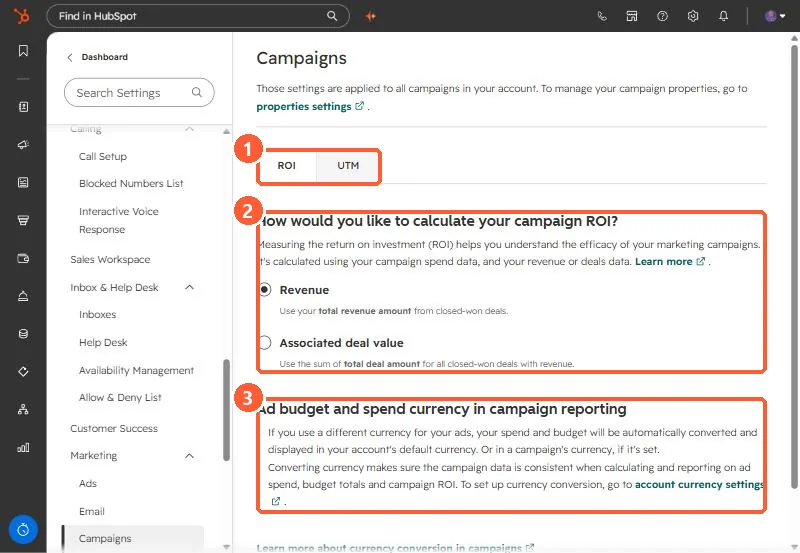
- Revenue: total revenue from closed-won deals. HubSpot lists this option for Marketing Hub Professional.
- Associated deal value: the total deal amount for closed-won deals with revenue.
- Ad spend in another currency is converted to your default currency, or the campaign's currency. See multiple currencies.
2. UTM identifiers
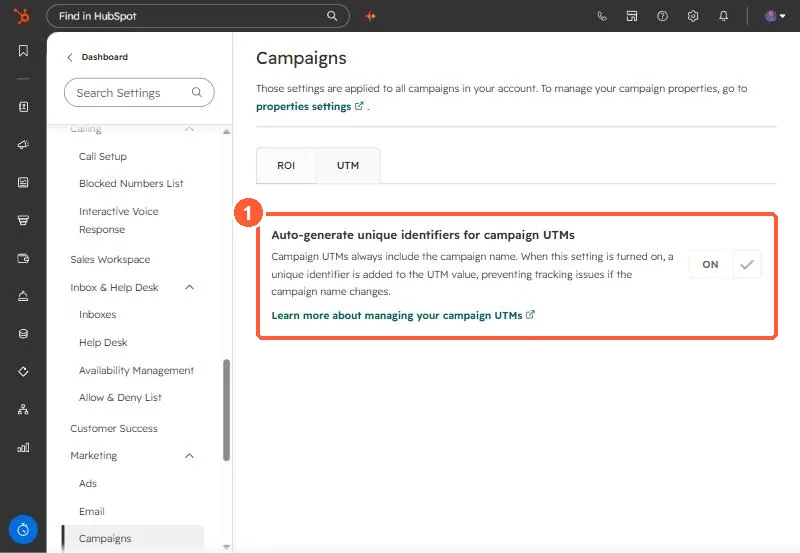
The page says campaign UTMs always include the campaign name, and with this on a unique identifier is added so a renamed campaign does not break tracking. Leave it on unless you have a reporting reason not to. For why a campaign shows no sessions, see campaign shows zero sessions.