Short answer
Go to Settings, Objects, Contacts, Lifecycle Stage. You can add, rename, and reorder stages, and set the display color style. Contacts and companies share these settings: the page says changing a stage name or color on contacts also changes it on companies. A banner warns that integrations using preset lifecyclestage values need to update to read the property from the CRM Properties API. HubSpot will not let you delete a stage that holds records, is used in tools, or is a connected app default.
1. The Lifecycle Stage tab
Open lifecycle stage settings. A tour may pop up the first time.
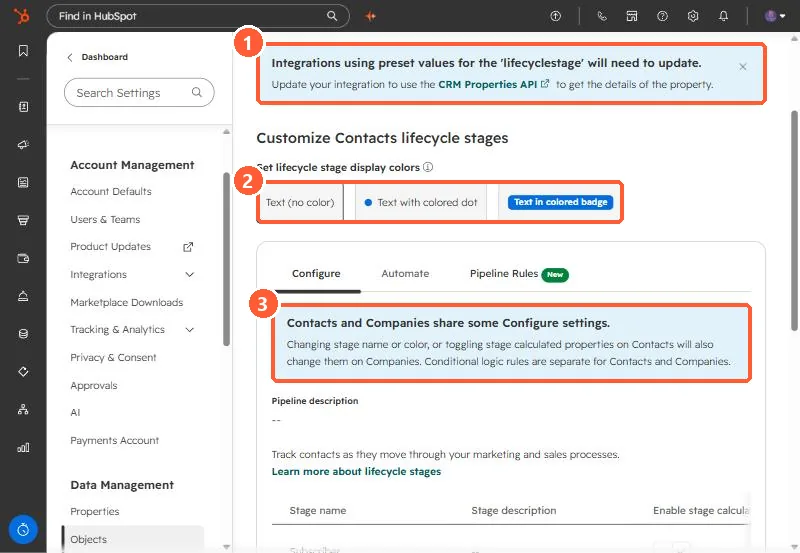
- Integrations banner. Integrations using preset values for
lifecyclestagewill need to update, using the CRM Properties API to get the property's details. - Display colors. Text with no color, a colored dot, or a colored badge.
- Shared settings. Contacts and companies share some Configure settings. Conditional logic rules are separate for each.
2. Add, edit, delete
- Add stage creates a custom stage, and HubSpot creates calculated properties for it.
- Edit renames it. Drag reorders it.
- Delete is blocked until you move records out of the stage and remove it from HubSpot tools. A stage that is a default for a connected app cannot be deleted.
3. Before you rename
Workflows, segments, and reports point at the stage, and outside tools may send stage values by name. Check them first, and see default lifecycle and deal stages and lifecycle stage automation.