Quick tipHow toData HubSales Hub

Sync Microsoft Dynamics 365 with HubSpot

Two-way sync needs Read and Write on each Dynamics record type.

Subscription
Data Hub for custom field mappings
Permissions
App Marketplace access
Time
5 min · Advanced
Last verified

Short answer

HubSpot's KB: two-way sync needs Read and Write permissions for each record type in Dynamics 365. Tasks must be associated with another record to sync. You can create Dynamics sales orders from deals or workflows; a line item price changed on the HubSpot deal won't sync to the created sales order. Custom field mappings need Data Hub.

1. Data integration

Sync settings live under data integration in my demo portal.
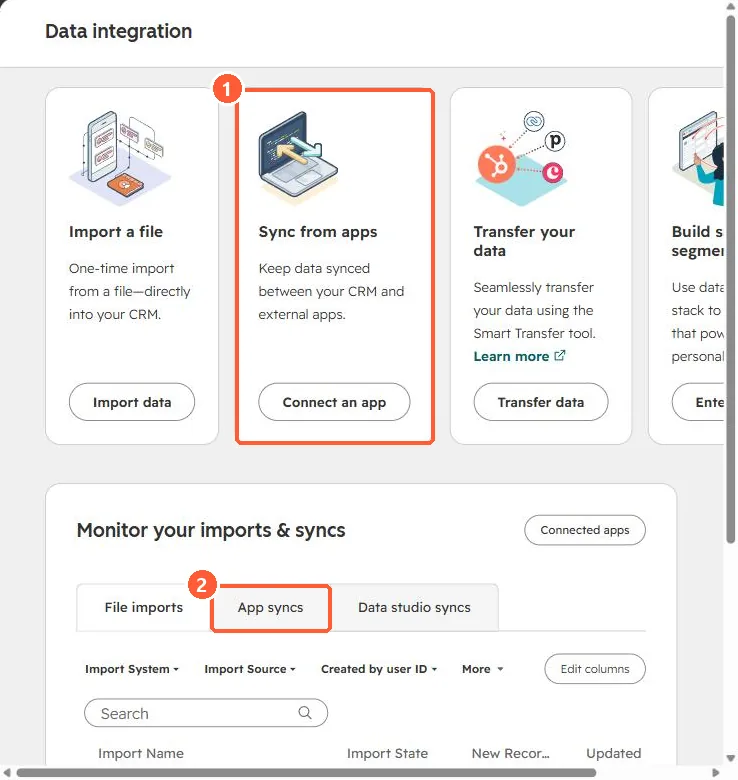
Data integration page with Sync from apps card and App syncs tab
Sync from apps (1) and App syncs (2).

2. Plan first

Decide which system owns each field before turning on two-way sync.

3. Related

Field mappings.

Sources

New field notes by email

One email when a new article publishes.

Still stuck?

If this did not fix it, the problem is probably specific to your setup. Book a call and we will look at it together.

Book a call with Sam