Quick tipHow toContent Hub

Share a direct link to a file in HubSpot

Browsers decide whether it opens or downloads.

Subscription
All tiers
Permissions
Super Admin or View files permission
Time
2 min · Beginner
Last verified

Short answer

HubSpot's KB: you need Super Admin or View permission for files to get a direct link. There's no way to force a download without a server-side script, which the files tool doesn't support. Packaging the file as a .zip prompts a download in most browsers.

1. In HubSpot

The relevant screen in my demo portal.
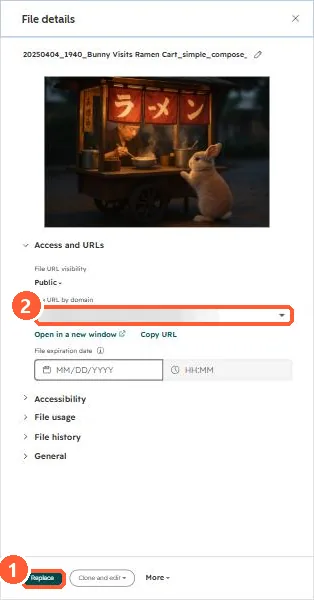
File details panel with the file URL and Replace button
Replace (1) and the file URL (2).

2. Worth knowing

Replacing the file keeps the same URL, so shared links keep working.

3. Related

Replace a file and keep its URL.

Sources

New field notes by email

One email when a new article publishes.

Still stuck?

If this did not fix it, the problem is probably specific to your setup. Book a call and we will look at it together.

Book a call with Sam