Quick tipHidden trickContent HubMarketing Hub

Replace a file and keep the same URL

Replace keeps the URL. Uploading a new file doesn't.

Subscription
All tiers
Permissions
Files permission
Time
2 min · Beginner
Last verified

Short answer

HubSpot's KB: in the file details panel, click Replace to upload an updated version at the same file URL. The old file may be cached for up to two hours. Files are on public URLs by default, so anyone with the link can open them.

1. File details

A file in my demo portal, URL blurred.
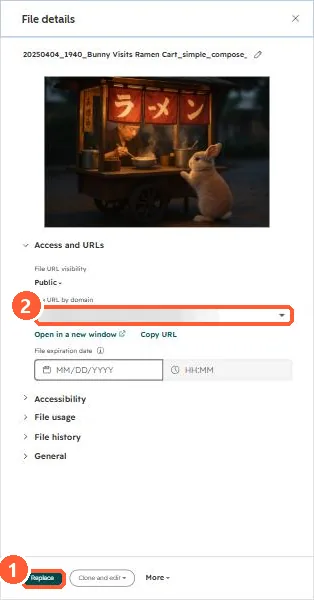
File details panel with the file URL and Replace button
Replace (1) and the file URL (2).

2. In emails

See PDFs in emails.

3. Related

Gated downloads.

Sources

New field notes by email

One email when a new article publishes.

Still stuck?

If this did not fix it, the problem is probably specific to your setup. Book a call and we will look at it together.

Book a call with Sam