Quick tipGotchaMarketing Hub

When a form submission creates a new contact, and when it updates an old one

A colleague submits from someone else's browser and overwrites their email. This setting controls that.

Subscription
All tiers
Permissions
Edit forms permission
Time
4 min · Intermediate
Last verified

Short answer

In the updated form editor, Settings > General has Automatically create new contacts from unknown email addresses. The legacy editor's equivalent, per HubSpot's KB, is Always create new contact for email address, which creates a new contact for every new email "regardless of any matching usertokens" from the browser cookie. Without it, a new email from a known browser can update the cookie's existing contact.

1. The setting

Form settings in my demo portal: create new contacts and set them as marketing are both on.
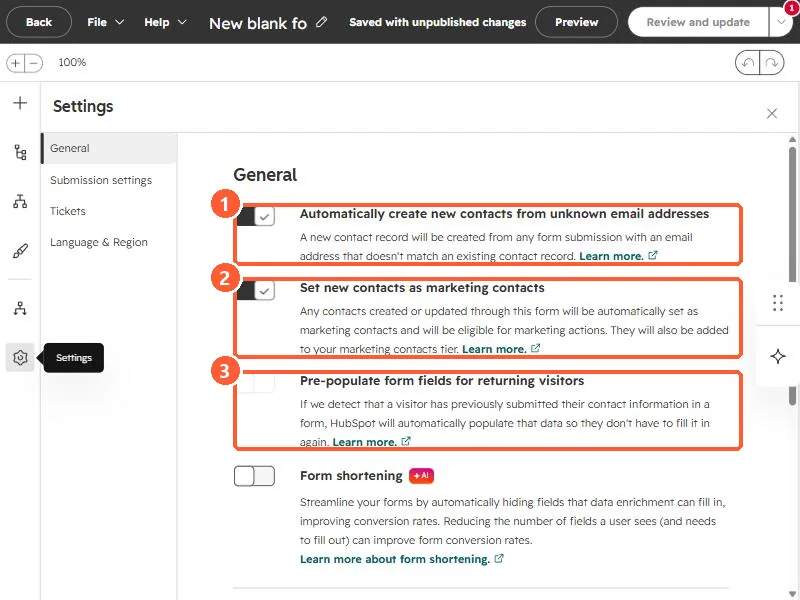
Form General settings with automatically create new contacts, set new contacts as marketing contacts, and pre-populate fields
New contacts (1), marketing contacts (2), and pre-populate (3).

2. Shared computers

Events, kiosks and shared office machines are where this setting matters most.

3. Related

Two contacts, one email.

Sources

New field notes by email

One email when a new article publishes.

Still stuck?

If this did not fix it, the problem is probably specific to your setup. Book a call and we will look at it together.

Book a call with Sam