Quick tipHow toMarketing Hub

Send an email after a form submission

Free: one simple workflow per form.

Subscription
All tiers
Permissions
Forms and email access
Time
2 min · Beginner
Last verified

Short answer

HubSpot's KB: under Send an email after form submission, click Create this workflow. Free tools allow one simple workflow per form with one action. Marketing Hub Starter allows up to 10 actions in a simple workflow.

1. In HubSpot

The relevant screen in my demo portal.
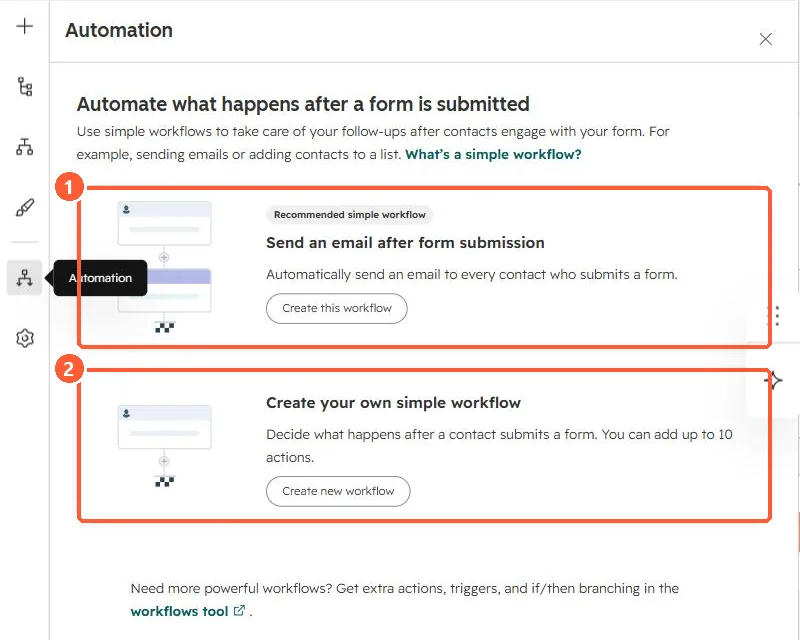
Form Automation panel with Send an email after form submission and Create your own simple workflow cards
The follow-up email workflow (1) and a custom simple workflow (2).

2. Worth knowing

Sending submissions to an outside address is a separate notification setting.

3. Related

Form follow-up email and submission notifications.

Sources

New field notes by email

One email when a new article publishes.

Still stuck?

If this did not fix it, the problem is probably specific to your setup. Book a call and we will look at it together.

Book a call with Sam