Quick tipHow toSmart CRM

Install HubSpot for Google Sheets

A Workspace admin who's a HubSpot user installs it.

Subscription
Check your subscription
Permissions
Google Workspace admin to install
Time
2 min · Intermediate
Last verified

Short answer

HubSpot's KB: any HubSpot user who's also a Google Workspace administrator can install the extension. Each user grants HubSpot permission to read and edit their Sheets. Then use Breeze Assistant in Sheets.

1. In HubSpot

The relevant screen in my demo portal.
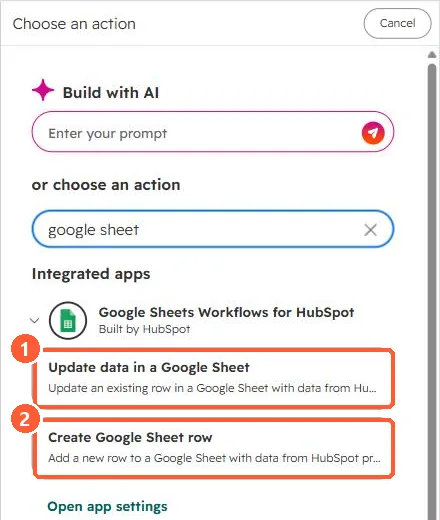
Workflow action search for google sheet showing Update data in a Google Sheet and Create Google Sheet row
Update a row (1) and create a row (2).

2. Worth knowing

Ongoing exports to a sheet are a workflow action, not this extension.

3. Related

Google Sheets workflow action.

Sources

New field notes by email

One email when a new article publishes.

Still stuck?

If this did not fix it, the problem is probably specific to your setup. Book a call and we will look at it together.

Book a call with Sam