Quick tipHow toSmart CRMData Hub

Send HubSpot data to Google Sheets from a workflow

A sheet that fills itself from workflows is often enough for a shared tracker.

Subscription
Workflows need Professional or Enterprise
Permissions
Workflows access and a connected Google account
Time
4 min · Intermediate
Last verified

Short answer

Search the workflow action picker for Google Sheet. The Google Sheets integration adds Create Google Sheet row and Update data in a Google Sheet. Map each value by choosing the sheet's column header. Values from earlier actions, such as Format data or Validate and format phone number, can be sent as action outputs.

1. The actions

Searching the picker in my demo portal, where the app is installed. I browsed without adding an action.
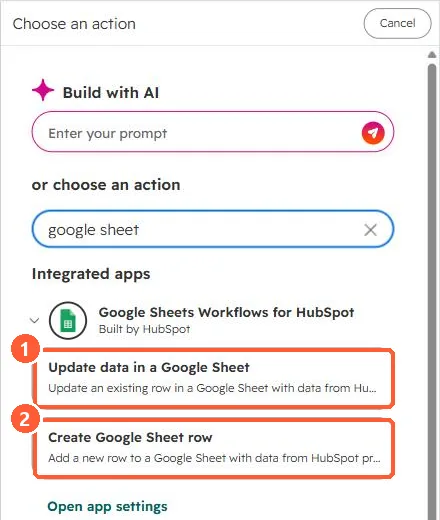
Workflow action search for google sheet showing Update data in a Google Sheet and Create Google Sheet row
Update a row (1) and create a row (2).

2. Tips

  • Keep the header row stable; mappings use the headers.
  • Clean values first with Format data.

3. Related

Exporting from a view.

Sources

New field notes by email

One email when a new article publishes.

Still stuck?

If this did not fix it, the problem is probably specific to your setup. Book a call and we will look at it together.

Book a call with Sam