Quick tipHow toMarketing Hub

Manage multiple brands in one account

Marketing Hub Enterprise plus the Brands add-on.

Subscription
Marketing Hub Enterprise with Brands add-on
Permissions
Super Admin or brand settings
Time
2 min · Advanced
Last verified

Short answer

HubSpot's KB: Marketing Hub Enterprise accounts with the Brands add-on manage multiple brands in one account from the brands settings page. The KB has guidance on whether Brands suits your organization.

1. In HubSpot

The relevant screen in my demo portal.
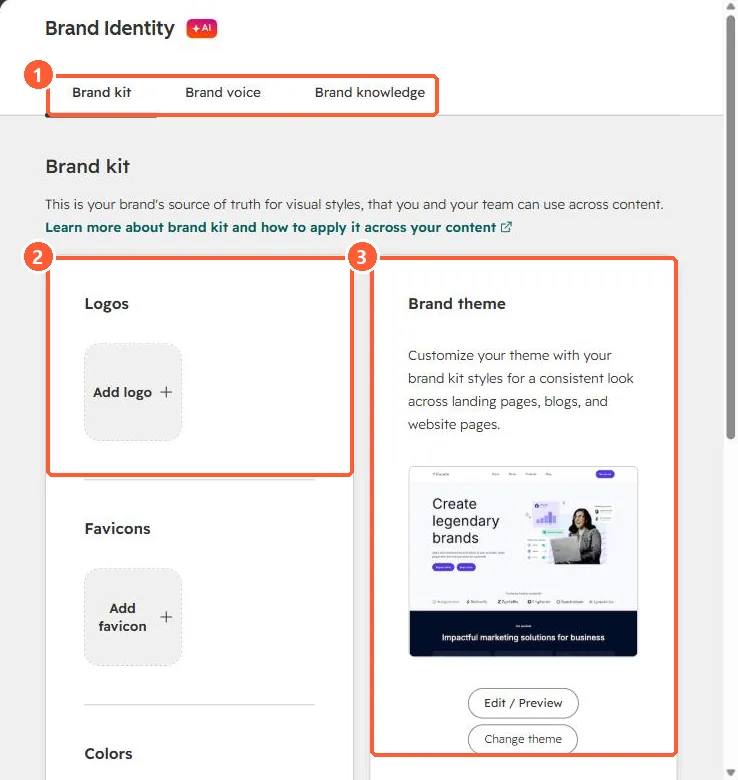
Brand Identity page with Brand kit, Brand voice and Brand knowledge tabs, empty logo and favicon slots and a brand theme preview
Tabs (1), logos and favicons (2), and the brand theme (3).

2. Worth knowing

Brands also changes how primary domains and dedicated IPs are assigned.

3. Related

Dedicated IPs per brand and brand kit.

Sources

New field notes by email

One email when a new article publishes.

Still stuck?

If this did not fix it, the problem is probably specific to your setup. Book a call and we will look at it together.

Book a call with Sam