Quick tipHow toSmart CRM

Multi-account management: connect several HubSpot accounts into one organization

Groups related HubSpot accounts so data and reports can be shared on purpose.

Subscription
Main account must be Enterprise
Permissions
Super Admin in every account
Time
3 min · Advanced
Last verified

Short answer

HubSpot's KB: the main account where you create the organization must have an Enterprise subscription, and you must be a Super Admin in both the Enterprise account and each account you add. Find it under Settings > Organization Management > Multi-Account. In my demo portal Create Organization is greyed out, with an Eligibility Rules link beside it.

1. The page

My demo portal:
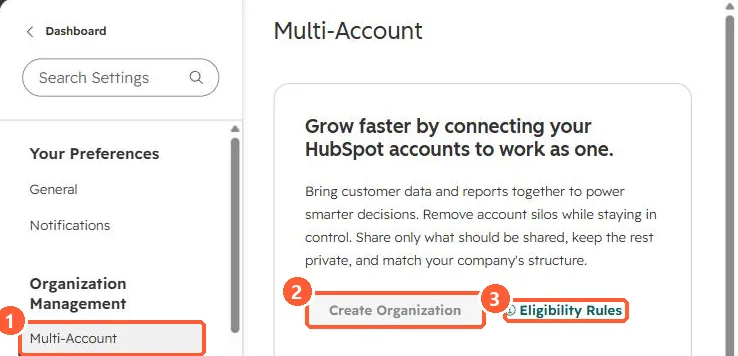
Multi-Account settings with a greyed Create Organization button and Eligibility Rules link
Multi-Account (1), Create Organization (2), and Eligibility Rules (3).

2. Not the same as

  • Teams within one account. See permission sets.
  • Copying assets between accounts, which is the separate Asset Copying page.

3. Related

Finding a portal ID.

Sources

New field notes by email

One email when a new article publishes.

Still stuck?

If this did not fix it, the problem is probably specific to your setup. Book a call and we will look at it together.

Book a call with Sam