Short answer
Use OAuth when one app needs to work in many HubSpot accounts; use a service key for one account. The client ID, client secret and redirect URLs are in the app's authentication settings under Client credentials. Send users to the authorization URL with your scopes, exchange the returned code for tokens, and refresh the access token before it expires: read expires_in from every token response and always keep the newest refresh token. Privately distributed OAuth apps install in up to 10 allowlisted accounts; Marketplace apps in up to 25 before listing.
1. OAuth, service key or token?
| Need | Use |
|---|---|
| A script or integration for one account's REST API | Service key, see service keys |
| An app installed by other companies' HubSpot accounts | OAuth (public or privately distributed app) |
| Webhooks or UI extensions | A project-based app |
| Third-party transcripts or other OAuth-only APIs | OAuth |
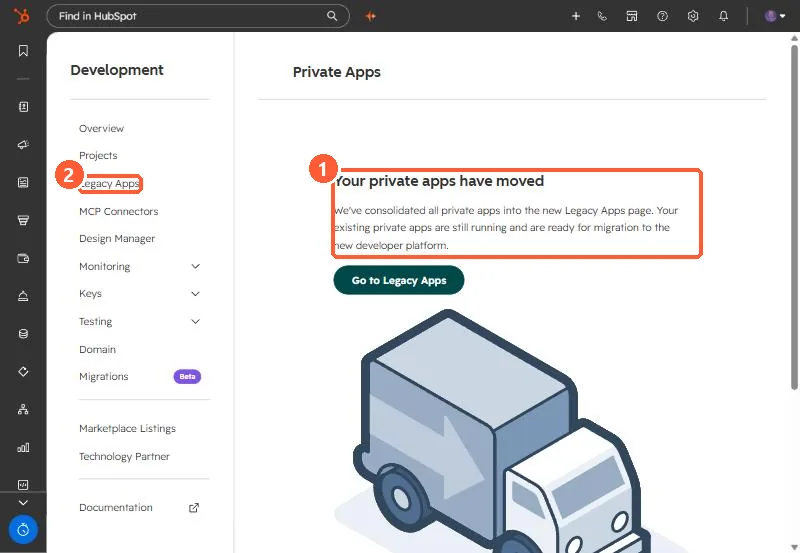
Private apps have moved to Legacy Apps, and new ones cannot be created in production accounts:
2. Find the client ID and secret
In your developer account or project app, open the app's authentication settings. Under Client credentials are the client ID and client secret, and below them the redirect URLs.
- The client secret is confidential. Keep it server-side and rotate it if it leaks.
- Redirect URLs must match what you send exactly. Production apps need https.
- Install limits: privately distributed apps install in up to 10 allowlisted accounts; Marketplace apps in up to 25 accounts before they are listed.
3. The authorization URL
https://app.hubspot.com/oauth/authorize
  ?client_id=YOUR_CLIENT_ID
  &scope=oauth%20crm.objects.contacts.read
  &optional_scope=automation
  &redirect_uri=https://yourapp.example.com/oauth-callback
&state=RANDOM_VALUEscope: required scopes, separated by URL-encoded spaces (%20).optional_scope: scopes dropped if the installing account does not have those products.state: a random value you check on return to protect against forged callbacks.
After the user approves, HubSpot redirects to your redirect_uri with a code. Exchange it at the token endpoint for an access token and a refresh token.
4. Refresh tokens without breaking
POST https://api.hubapi.com/oauth/v1/token
Content-Type: application/x-www-form-urlencoded

grant_type=refresh_token
&client_id=YOUR_CLIENT_ID
&client_secret=YOUR_CLIENT_SECRET
&refresh_token=LATEST_REFRESH_TOKEN- Access tokens expire. The lifetime in seconds is in
expires_inon every token response; HubSpot's developer blog uses 30 minutes in its example. Read it rather than hard-coding a value. - Refresh slightly before expiry instead of waiting for a 401.
- Store the newest refresh token the response returns.
- Never put refresh tokens or client secrets in a shared cache, logs or front-end code.
Access tokens are subject to the normal API limits. See API rate limits.
5. What is changing for 2027
- Projects for new apps. New apps are built as developer platform projects; see developer projects and test accounts.
- Service keys cover single-account work. With legacy private app creation off, OAuth is for multi-account apps and service keys for one account.
- Dated API versions. Calls your OAuth app makes to v4 or 2025-09 APIs lose support in March 2027. See API versioning.
Common questions
Where is my client secret?
In the app's authentication settings under Client credentials.
My integration fails every half hour with 401.
The access token expired. Refresh it before expires_in runs out and store the newest refresh token.
Do I need OAuth for my own company's account?
No. Use a service key, unless the API you need is OAuth only.
Why did some scopes not get granted?
Scopes in optional_scope are dropped when the account lacks those products.