Short answer
Private apps are now legacy apps, under Development, Legacy Apps. HubSpot turned off creating new ones in production accounts on September 28, 2026 (accounts created that day or later) and October 26, 2026 (older accounts). Existing private apps and their tokens keep working. For a new in-account integration, create a service key: Development, Keys, Service Keys, name it, pick scopes, and send it as a Bearer token. Service keys only make REST API calls. For webhooks or UI extensions you need a project-based app. Sandbox and test accounts can still create legacy private apps.
1. Where private apps went
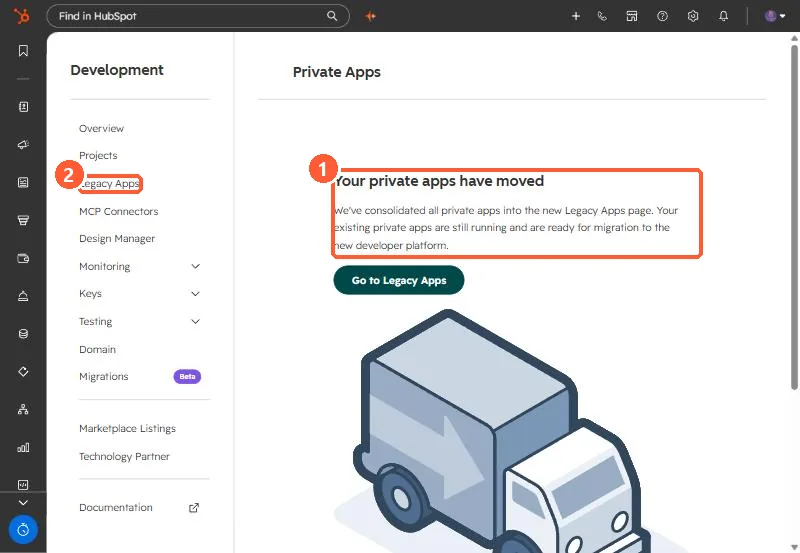
The old Private Apps link now shows a "Your private apps have moved" page (1), and the apps live in Legacy Apps in the Development menu (2):
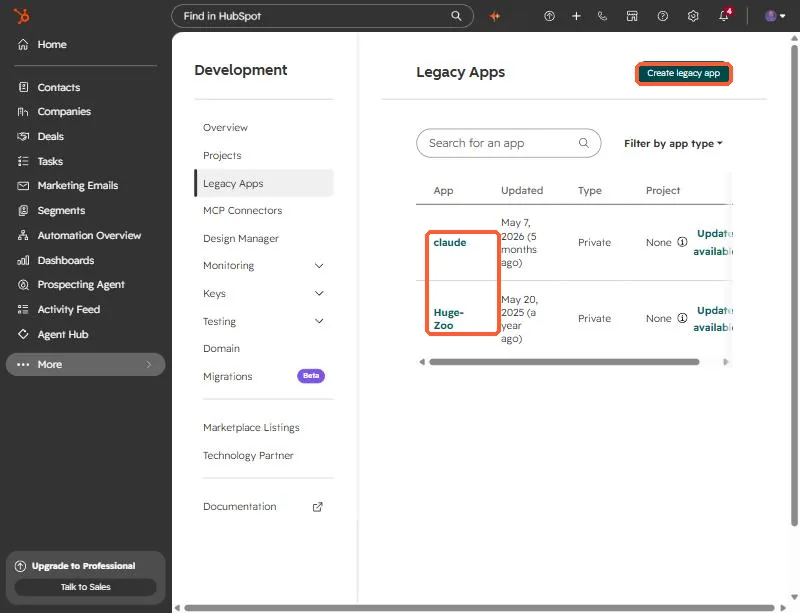
Open the app that owns a token to see or change its scopes:
2. The creation cutoff, and the exception
| Account | New legacy private apps disabled |
|---|---|
| Created on or after September 28, 2026 | September 28, 2026 |
| Created before September 28, 2026 | October 26, 2026 |
| Sandbox and developer test accounts | Still allowed |
HubSpot's changelog says existing legacy private apps "are not affected at this time and continue to work as-is", and gives no retirement date for them. The token I used for this site's API tests on November 15, 2026 belongs to a legacy private app and worked normally.
The exception is not in the changelog but it is on the page. When I opened Legacy Apps in my developer test account on November 15, 2026, the Create legacy app button was still there (2), with this notice (1):

The point is to let you mirror a production setup for testing. In production, HubSpot's direction is service keys or project-based apps.
3. Create a service key
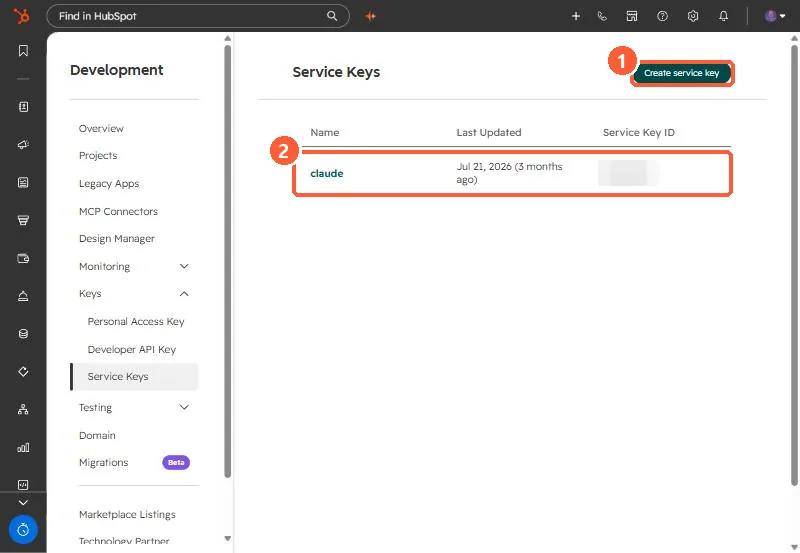
Super Admins and users with the Developer tools access permission can create and manage service keys. Go to Development, Keys, Service Keys and click Create service key (1):
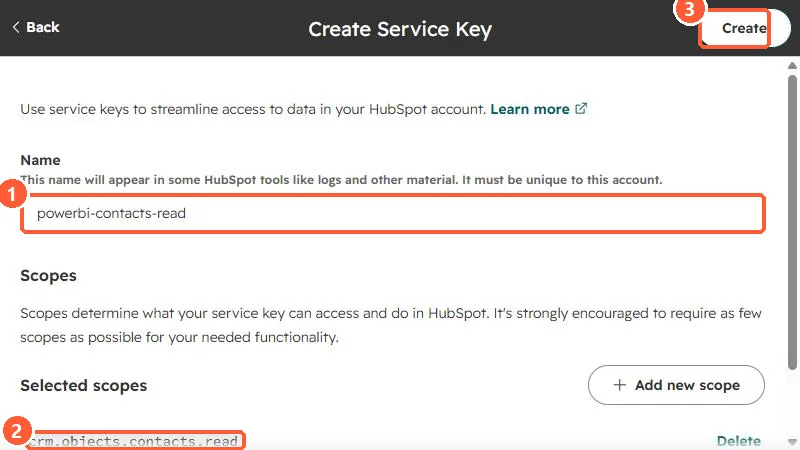
- Name it for its job, such as
powerbi-contacts-read. The name must be unique in the account and shows up in logs. - Click Add new scope, search with Find a scope, tick what the job needs, and click Update. A key can only get scopes the creating user already has. Some scopes may be greyed out for your user.
- Click Create and confirm.
Open the key, click Show, then Copy, and send it as a Bearer token:
curl --request GET \
  --header "Authorization: Bearer pat-na1-xxxxxxxx-xxxx-xxxx-xxxx-xxxxxxxxxxxx" \
  --url "https://api.hubapi.com/crm/v3/objects/contacts?limit=10"
A service key is a password. Put it in an environment variable or a secrets store, never in front-end code, a committed file, or a chat with an AI agent.
4. Rotate, log and delete
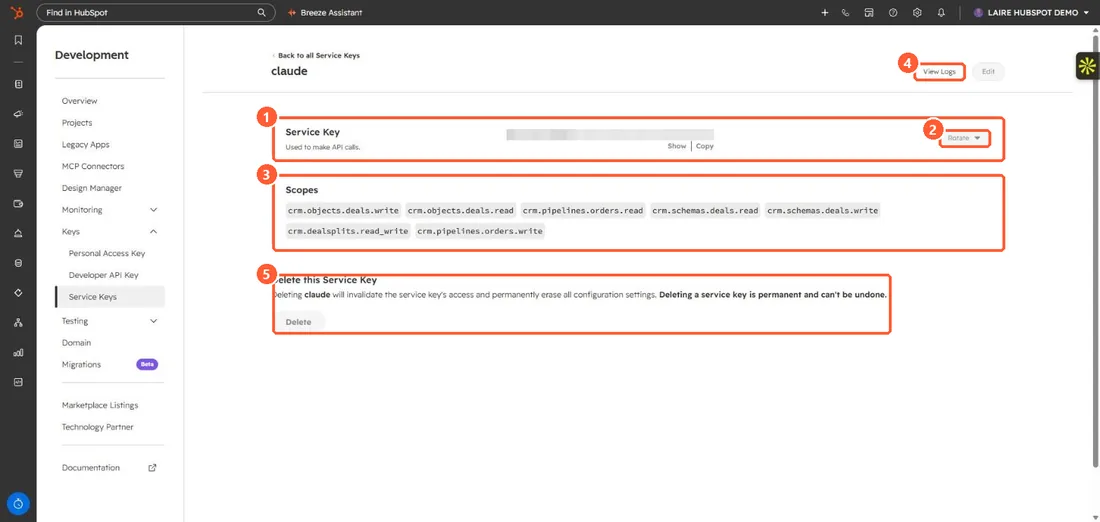
- View logs shows recent requests made with the key.
- Rotate creates a new key. Rotate and expire now is for a leaked key. Rotate and expire later keeps the old one working for 7 days so you can swap it in your systems. You can also set automatic rotation every 3, 6 or 12 months. HubSpot recommends rotating every six months.
- Delete is permanent. You confirm by typing the key's name.
5. Service key, legacy private app, or app?
| You need | Use |
|---|---|
| A script, BI tool or data warehouse reading or writing one account through the REST API | Service key |
| Webhooks, UI extensions (CRM cards) or other developer platform features | A project-based app |
| One integration for many customer accounts | A public app with OAuth. See OAuth for HubSpot apps. |
| An existing integration on a private app token | Leave it running, but inventory it and plan the move |
There is a combined limit of 100 project-based apps, service keys and MCP connectors per account, and service keys have the same API limits as privately distributed apps. See API rate limits.
The old developer API key is a different thing. It lives in a developer account and is only used where an endpoint's docs ask for the hapikey parameter.
6. What is changing for 2027
- No new private apps in production. Anyone following an older tutorial that says "create a private app" will not find the button. Point them to service keys.
- Inventory existing private apps now. No retirement date has been announced. List every private app, its scopes, and what depends on it, so a future migration is planned rather than urgent.
- Dated API versions. The same platform shift moved the REST APIs to date-based versions, with v4 and the 2025-09 versions unsupported from March 2027. If you are rewriting an integration onto a service key, move it to the dated URLs at the same time. Details in the API rate limits guide.
- Keys are an audit item. Each key shows its own request log. Review keys and their scopes when people who created them leave.
Common questions
I cannot find "Create private app". Where did it go?
It was removed from production accounts on September 28 or October 26, 2026, depending on when the account was created. Create a service key under Development, Keys, Service Keys.
Will my existing private app token stop working?
Not as of November 2026. HubSpot says existing legacy private apps continue to work as-is and has not announced a retirement date.
Can a service key receive webhooks?
No. Service keys only authenticate REST API requests. Webhooks need a project-based app.
Why is a scope greyed out when I create a service key?
A key can only get scopes the creating user has. Check your own permissions, or ask a Super Admin to create the key.
Where is my HubSpot API key?
HubSpot stopped supporting account-level API keys on November 30, 2022. For one account, use a service key. The developer API key in a developer account is only for the few endpoints that ask for it.
Sources
- HubSpot developer changelog: Legacy private app creation being disabled (August 27, 2026)
- HubSpot developer docs: Legacy private apps
- HubSpot developer docs: Make API requests using a service key
- HubSpot developer changelog: Service Keys
- HubSpot developer changelog: Date-based API versioning
- HubSpot Knowledge Base: Authentication overview
- HubSpot Developer Announcements: API key sunset
- HubSpot Community: Where is my developer API key?