Short answer
HubSpot's commerce tools split across two subscriptions. Sales Hub covers the product library, quotes and quote approvals. Revenue Hub adds price books, tiered pricing (volume, graduated, stair-step) and e-signatures on newer quotes, and needs Revenue Hub seats to use them. Payment links and subscriptions work with HubSpot payments (Starter and above) or a connected Stripe account. Legacy quotes stay for Sales Hub accounts. An invoice with a payment against it cannot be voided: refund the payment instead.
1. Products
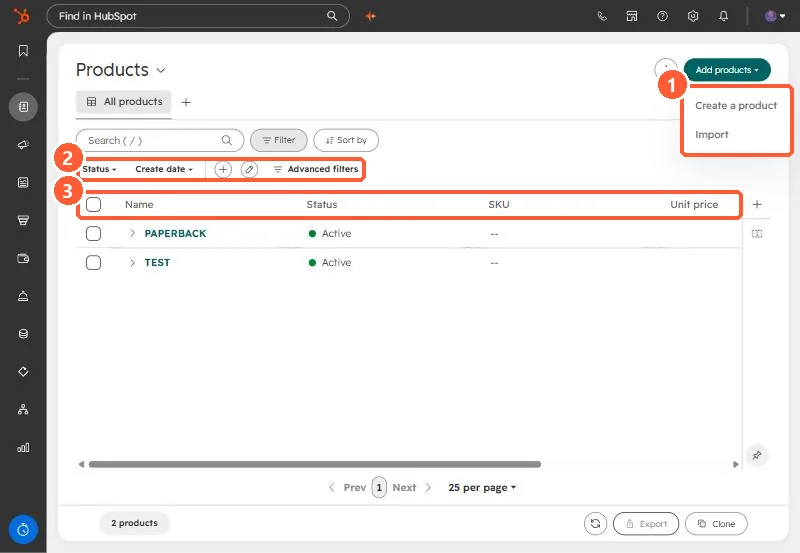
The product library is under Commerce, Products: Add products (1), quick filters (2) and columns (3).
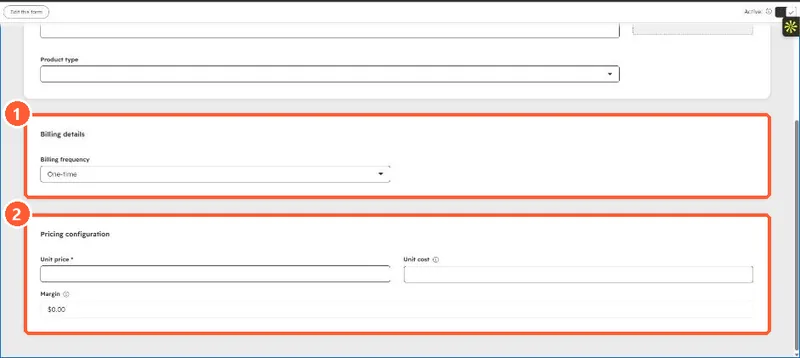
Without Revenue Hub, the create form's pricing section has Unit price, Unit cost and Margin only, plus billing frequency for recurring products:
Through the API, my demo portal's two products returned hs_pricing_model: flat, which is the single-price model.
2. Tiered pricing and price books (Revenue Hub)
- Tiered pricing: the product form's Pricing method offers volume-based, graduated and stair-step, each starting with two tiers. Volume-based bills all units at the rate of the tier the total quantity falls into. It needs a Revenue Hub subscription, and a Revenue Hub seat to create tiered products or add them to quotes and invoices.
- Price books hold different prices for the same products, for example referral, partner or regional pricing. To force reps to use them, turn off Create custom line items for users. Managing price books needs a Core or Revenue Hub seat.
3. Quotes
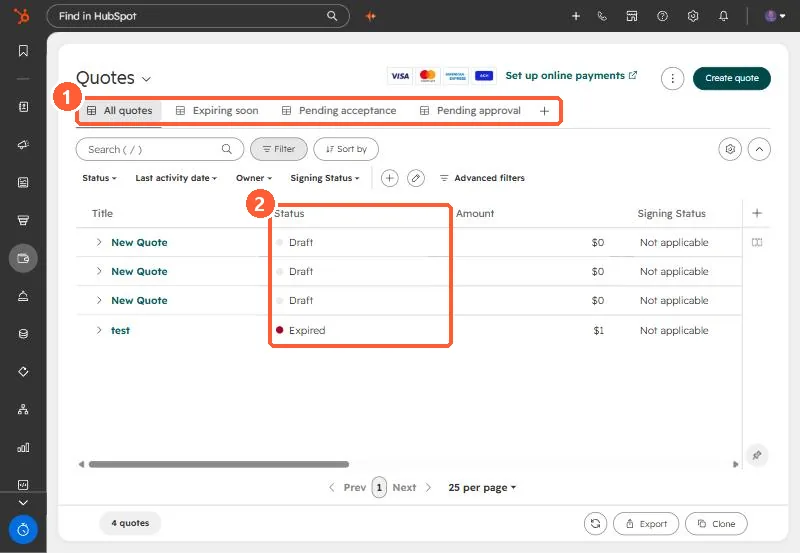
The quotes index has views for All quotes, Expiring soon, Pending acceptance and Pending approval (1), with status and signing status columns (2):
- An expired quote has passed the expiration date set when it was created. In the API, my demo portal's expired quote still had
hs_statusAPPROVAL_NOT_NEEDED; expiry comes from the date, not the status. Open it from the deal and view the PDF. The PDF link HubSpot generates expires after one hour. - Approvals: Settings, Objects, Quotes, Approvals. Standard approvals use simple rules; advanced approvals use an approval workflow.
- E-signatures: on legacy quotes they need Sales Hub; on newer quotes they need Revenue Hub.
Legacy quotes: Sales Hub accounts keep them after September 3, 2025. Free accounts keep them only if they created a quote in the six months before that date. Revenue Hub seats lose legacy quotes and templates if legacy quote creation is turned off.
4. Payment links
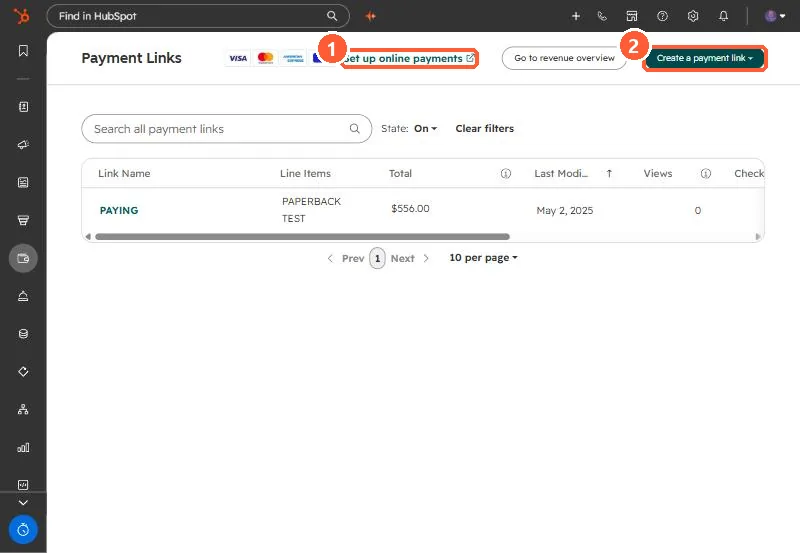
Payment links are checkout pages for one or more line items. Set up online payments (1) first, then Create a payment link (2):
| Processor | Available on | Notes |
|---|---|---|
| HubSpot payments | Starter, Professional, Enterprise | Processing through HubSpot; you choose the link's domain. Not supported in sandboxes. |
| Stripe | All subscriptions | Processing and payment reporting stay in Stripe. |
Test the flow in a sandbox account with Stripe's test values; sandbox transactions do not reach your main account. To take payment after a form, create the payment link first, then set the form to redirect to it. See form redirects.
5. Invoices, credit memos and subscriptions
- An invoice with payments against it cannot be voided. Refund the payment instead.
- A credit memo is associated with an invoice when you apply it.
- Invoices tied to a credit memo, an online payment or a subscription cannot be deleted. With a manual payment, delete the payment first.
- Subscriptions automate recurring payments or invoices with line items, taxes, discounts and fees. Invoices can be due on receipt or on net terms. These are subscriptions you sell to buyers, not your own HubSpot plan.
6. What is changing for 2027
- Revenue Hub is the commerce tier. Price books, tiered pricing, and e-signatures on newer quotes moved behind Revenue Hub subscriptions and seats. Check seat assignments before rolling these out.
- Legacy quotes are being phased out for some accounts. Free accounts without recent quotes lost them after September 3, 2025, and Revenue Hub accounts can turn legacy creation off.
- Payments in sandboxes. HubSpot payments does not run in sandboxes, so test with Stripe test values.
Common questions
Why is there no tiered pricing option on my product form?
Tiered pricing needs Revenue Hub and a Revenue Hub seat. Without them the form shows a single unit price.
Can I void an invoice that was paid?
No. Refund the payment instead.
Can I use payment links without HubSpot payments?
Yes, by connecting a Stripe account, on any subscription.
Why does a quote link I shared stop working?
The PDF link HubSpot generates for viewing expires after one hour. Share the quote itself, or generate the PDF again.
Sources
- HubSpot Knowledge Base: Create and manage products
- HubSpot Knowledge Base: Understand HubSpot CPQ
- HubSpot Knowledge Base: Use price books
- HubSpot Knowledge Base: Manage legacy quotes
- HubSpot Knowledge Base: Set up quote approvals
- HubSpot Knowledge Base: Use e-signatures with quotes
- HubSpot Knowledge Base: Create and share payment links
- HubSpot Knowledge Base: Use forms to collect payments
- HubSpot Knowledge Base: HubSpot payments FAQ
- HubSpot Knowledge Base: Create and apply credit memos
- HubSpot Knowledge Base: Manage invoices
- HubSpot Knowledge Base: Create subscriptions
- HubSpot developer docs: Products API