Quick tipHow toSmart CRM

Connect a Salesforce sandbox

Pick the sandbox option at install.

Subscription
Check app requirements
Permissions
App Marketplace access
Time
2 min · Advanced
Last verified

Short answer

HubSpot's KB: connect either a Salesforce production org or a sandbox. During install, select the option confirming a sandbox connection. If production is already connected, the KB has separate steps.

1. In HubSpot

The relevant screen in my demo portal.
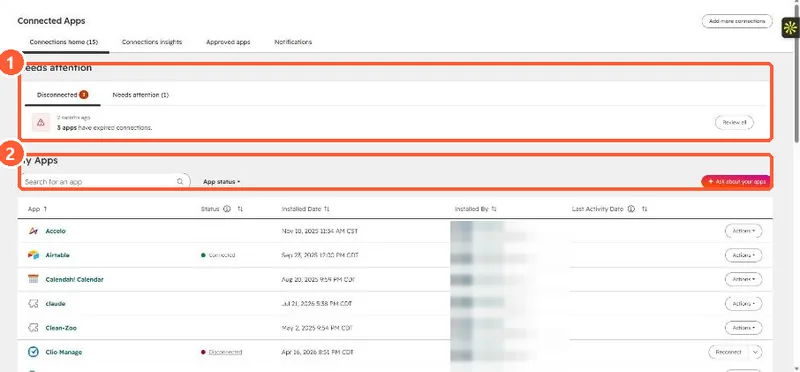
Connected Apps page with a Needs attention panel showing disconnected apps and the My Apps list
Needs attention (1) and installed apps (2).

2. Worth knowing

Test mappings in the sandbox before production.

3. Related

Salesforce sync rules.

Sources

New field notes by email

One email when a new article publishes.

Still stuck?

If this did not fix it, the problem is probably specific to your setup. Book a call and we will look at it together.

Book a call with Sam