Quick tipHow toMarketing Hub

Send a marketing email at the same local time for everyone

Pick a time; each recipient gets it at that time in their zone.

Subscription
Marketing email tiers
Permissions
Marketing email publish access
Time
2 min · Beginner
Last verified

Short answer

HubSpot's KB: schedule a marketing email at a specific time in each recipient's time zone; it sends whenever that time next occurs there. You can't use it with A/B tested emails, and send-to-more isn't available, so clone the email for extra recipients.

1. In HubSpot

The relevant screen in my demo portal.
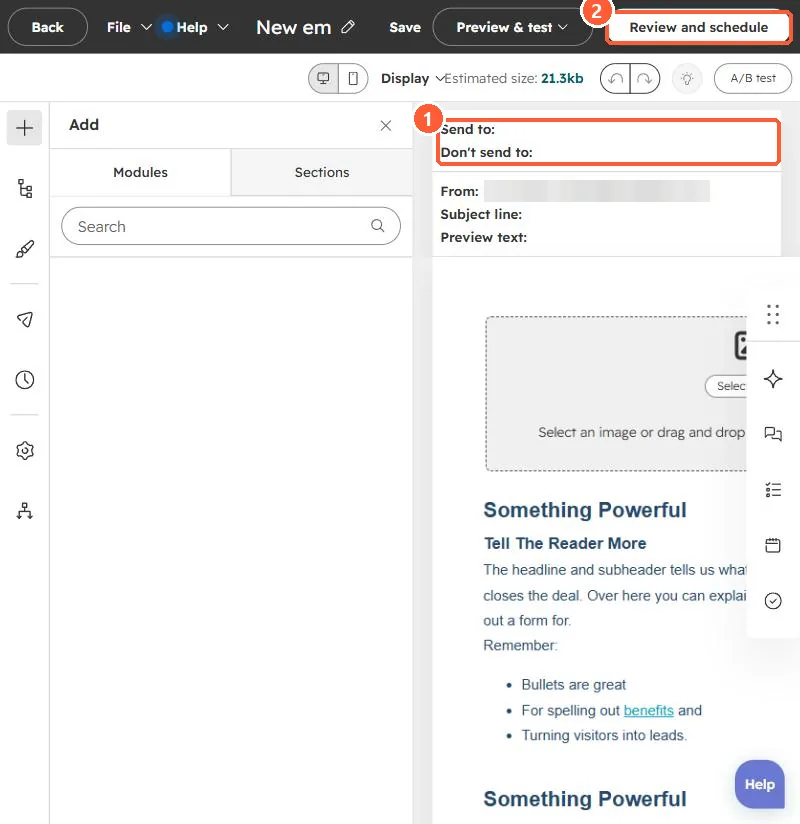
Marketing email editor with Send to and Don't send to fields and a Review and schedule button
Recipients (1) and Review and schedule (2).

2. Worth knowing

If the time has already passed in a zone on the scheduled day, that zone receives it the next time the time comes around.

3. Related

Contact time zones.

Sources

New field notes by email

One email when a new article publishes.

Still stuck?

If this did not fix it, the problem is probably specific to your setup. Book a call and we will look at it together.

Book a call with Sam