Quick tipGotchaMarketing HubContent Hub

Style a HubSpot form: where styles actually apply

On HubSpot pages, the form module's styles win.

Subscription
Raw HTML forms need Marketing or Content Hub Professional or Enterprise
Permissions
Edit forms permission
Time
3 min · Beginner
Last verified

Short answer

HubSpot's KB: themes and styles set in the form editor only apply to embedded forms or standalone form pages. Forms on HubSpot pages are styled with the form module style options. Only legacy forms can be set as raw HTML, which needs Marketing or Content Hub Professional or Enterprise.

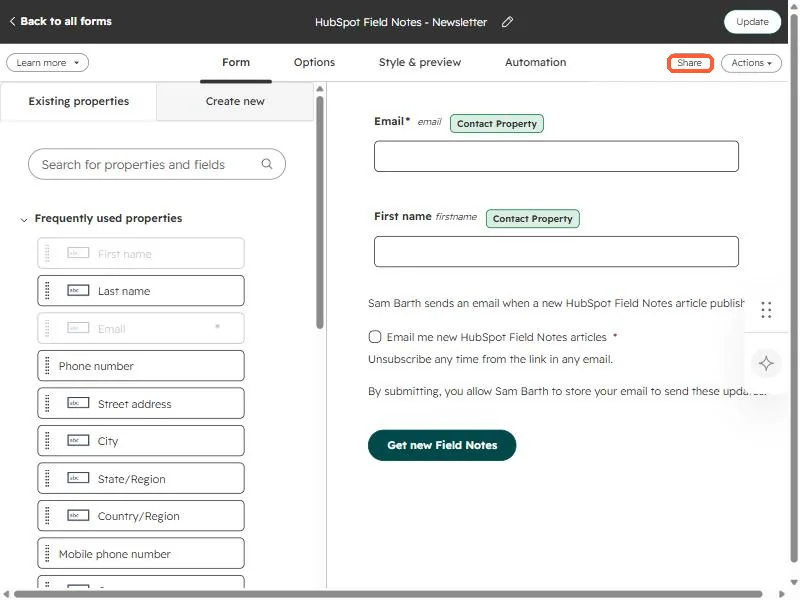
1. The form editor

A form in my demo portal.

HubSpot form editor showing an email field, a first name field, a consent checkbox, and the Share button highlighted
The form editor with the Share button (top right) highlighted.
2. Embedding

See embedding forms.

3. Related

Module style overrides.

Sources

New field notes by email

One email when a new article publishes.

Still stuck?

If this did not fix it, the problem is probably specific to your setup. Book a call and we will look at it together.

Book a call with Sam