Short answer
The product form's Pricing method dropdown offers volume-based, graduated and stair-step pricing, each starting with two tiers. HubSpot's KB says tiered pricing needs a Revenue Hub subscription, and a Revenue Hub seat to create tier-priced products or add them to quotes, invoices and other documents. Without that, the form shows a single unit price. For prices that differ by region, HubSpot points to price books, which also need Revenue Hub.
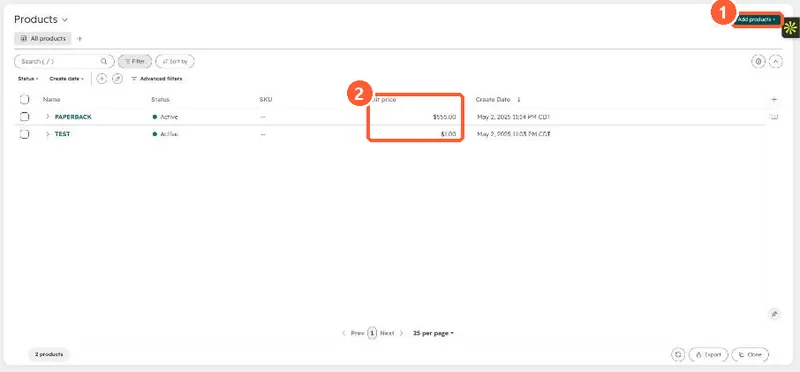
1. The product library
2. What the form shows without Revenue Hub
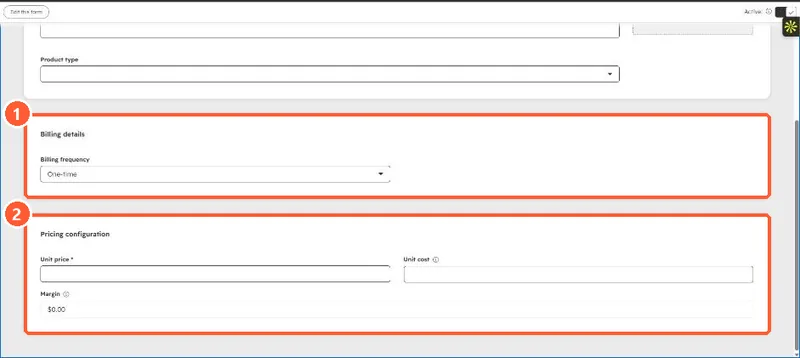
In my demo portal, which has no Revenue Hub, the create form's Pricing configuration section has Unit price, Unit cost and Margin only. There is no Pricing method dropdown. I closed the form without saving.
3. The pricing methods
- Volume-based: HubSpot's contracts API docs say all units are billed at the rate of the tier the total quantity falls into.
- Graduated and stair-step are the other two options. Check the KB article for how each one calculates before choosing.
For loading many products, see bulk creating products from a spreadsheet.