Quick tipHow toSmart CRM

Set up two-factor authentication for your login

Mobile app setup temporarily unavailable.

Subscription
All tiers
Permissions
Any user
Time
2 min · Beginner
Last verified

Short answer

HubSpot's KB: set up 2FA in your security settings and add a secondary method (SMS or an authenticator app). As of March 20, 2026, the HubSpot mobile app isn't available when setting up new 2FA methods; existing app setups still work.

1. In HubSpot

The relevant screen in my demo portal.
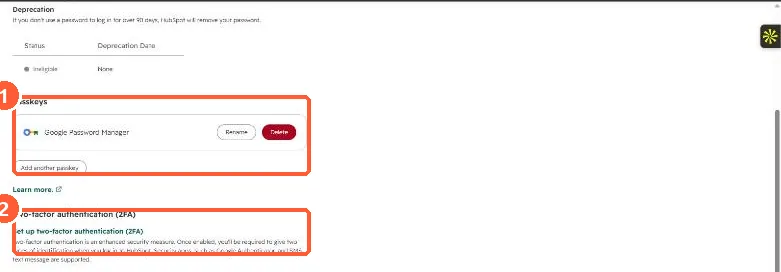
User security settings with a Passkeys section listing Google Password Manager and a Two-factor authentication section
Passkeys (1) and two-factor authentication (2).

2. Worth knowing

A backup method saves a lockout when you change phones.

3. Related

2FA lockouts and approved methods.

Sources

New field notes by email

One email when a new article publishes.

Still stuck?

If this did not fix it, the problem is probably specific to your setup. Book a call and we will look at it together.

Book a call with Sam