Quick tipHow toMarketing HubService Hub

WhatsApp message templates in HubSpot

Templates are approved by WhatsApp before HubSpot can use them.

Subscription
Check WhatsApp tier requirements
Permissions
Inbox and WhatsApp access
Time
3 min · Intermediate
Last verified

Short answer

HubSpot's KB: templates outside WhatsApp's categories are likely rejected and can't be used. You can insert variables to personalize in HubSpot, and some sections like headers can include media. From April 1, 2025, Meta paused WhatsApp marketing template messages to US numbers; utility and authentication messages continue. HubSpot recommends the updated template experience.

1. WhatsApp settings

WhatsApp settings in my demo portal.
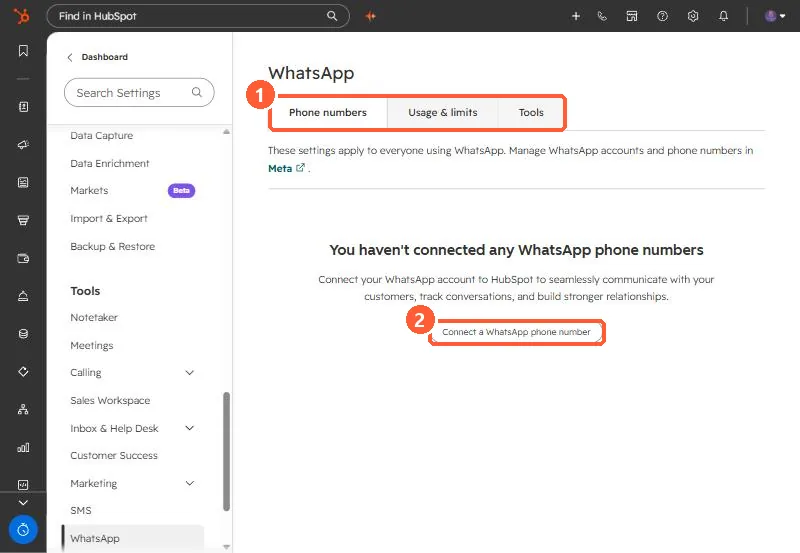
WhatsApp settings with Phone numbers, Usage and limits, and Tools tabs and a Connect a WhatsApp phone number button
The tabs (1) and Connect a WhatsApp phone number (2).

2. Consent

WhatsApp needs opt-in. See WhatsApp in HubSpot.

3. Related

SMS support.

Sources

New field notes by email

One email when a new article publishes.

Still stuck?

If this did not fix it, the problem is probably specific to your setup. Book a call and we will look at it together.

Book a call with Sam