Quick tipFix itSales HubSmart CRM

Turn the "create a follow-up task" prompt back on

If the prompt disappeared after someone dismissed it, it's a per-user preference.

Subscription
All tiers
Permissions
Any user for their own preferences
Time
2 min · Beginner
Last verified

Short answer

In Settings > General > Tasks, the Follow-up tasks section has checkboxes to be prompted to create a follow-up task when you complete a task from a list view and when you disqualify a lead. The same page sets default due date, due time and reminder. These are personal preferences, so each user sets their own.

1. The setting

My demo portal: both prompts on, default due date in 3 business days.
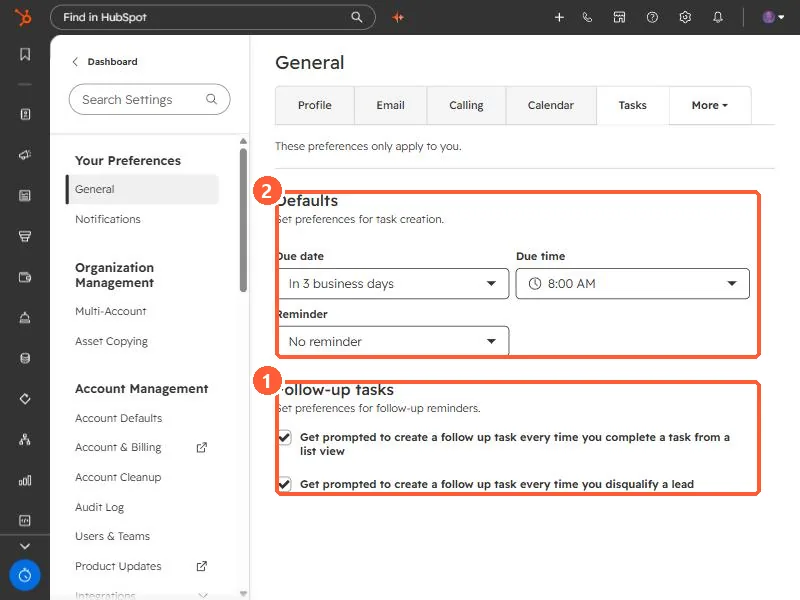
Tasks preferences with Follow-up tasks checkboxes and default due date, time and reminder
Follow-up prompts (1) and task defaults (2).

2. Tip

Tasks with call or email in the title get that task type automatically.

3. Related

Task queues and an empty tasks page.

Sources

New field notes by email

One email when a new article publishes.

Still stuck?

If this did not fix it, the problem is probably specific to your setup. Book a call and we will look at it together.

Book a call with Sam