Quick tipGotchaMarketing HubContent Hub

Track Google Ads conversions on HubSpot pages

Don't also install the pixel through HubSpot.

Subscription
Professional or Enterprise
Permissions
Website settings for all pages
Time
2 min · Intermediate
Last verified

Short answer

HubSpot's KB: paste the global site tag in the site header HTML and the event snippet in thank you pages' head HTML. If you add the tag manually, don't also install the Google Ads pixel through HubSpot, or it fires twice.

1. In HubSpot

The relevant screen in my demo portal.
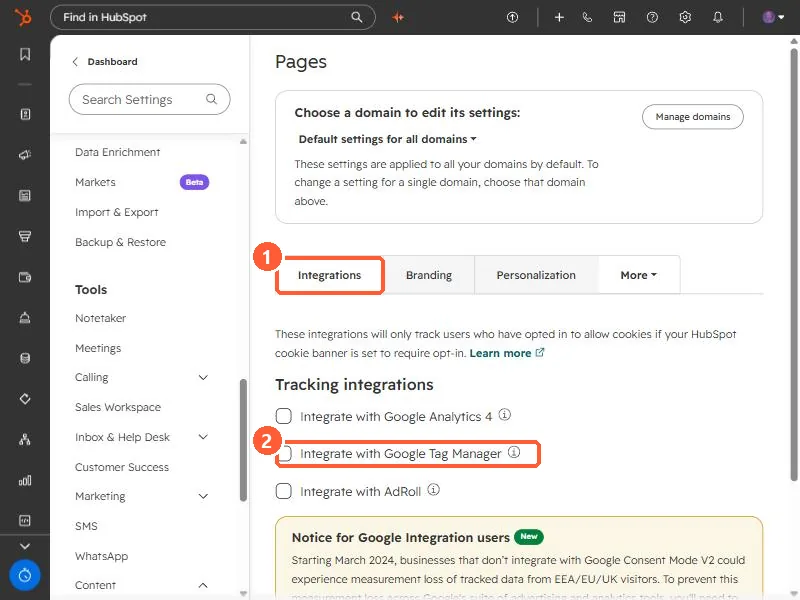
Pages settings Integrations tab with Integrate with Google Analytics 4, Google Tag Manager and AdRoll checkboxes
Integrations (1) and Google Tag Manager (2).

2. Worth knowing

Pick one installation method.

3. Related

Tracking URLs and ad conversion events.

Sources

New field notes by email

One email when a new article publishes.

Still stuck?

If this did not fix it, the problem is probably specific to your setup. Book a call and we will look at it together.

Book a call with Sam