Short answer
Consent banners are set in Settings, Privacy & Consent, Cookies. A default banner shows on every site that runs your HubSpot tracking code, including external sites, and a domain banner overrides it on one domain. HubSpot's banner controls HubSpot's cookies only (__hstc, hubspotutk, __hssc, __hssrc), not other scripts on the page. Google Consent Mode through HubSpot only works for EEA, EU and UK visitors if a HubSpot opt-in banner shows to them; with any other banner or setup, implement Consent Mode yourself. Each banner has its own Global Privacy Control switch.
1. Default and domain banners
Open Settings, Privacy & Consent, Cookies (1). Add external domain (2) adds a site that is not hosted on HubSpot, and the default banners are listed below (3).
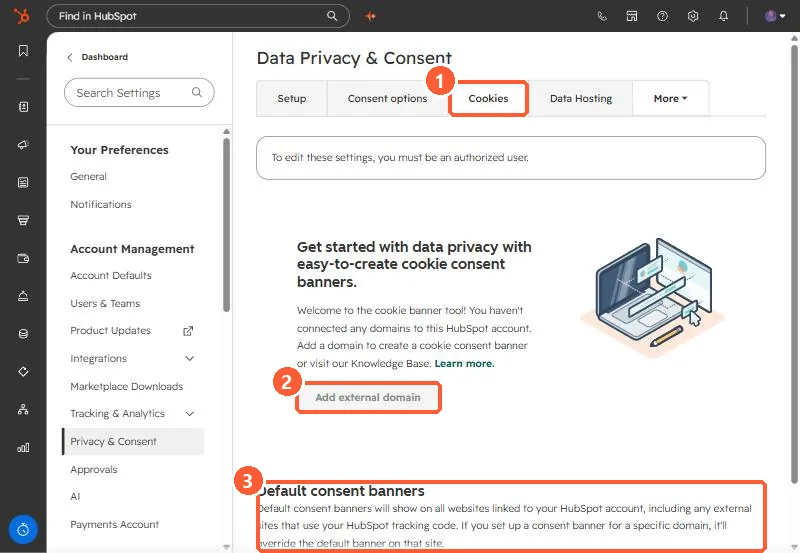
- Default banners show on every website linked to your account, including external sites with your tracking code.
- A banner for a specific domain overrides the default on that domain.
- HubSpot needs to verify a domain before you add a banner for it with the new editor.
- Accounts created after November 2022 have the new (v2) banner editor; older accounts are being migrated.
- Turning off data privacy settings does not turn off the banner. See GDPR settings.
The banner works on HubSpot pages and on external pages with the tracking code. To check a site has the code, see installing the tracking code.
2. What HubSpot's cookies are
| Cookie | Purpose | Expires |
|---|---|---|
__hstc | Main visitor tracking cookie: domain, hubspotutk, first, last and current visit timestamps, session number | 6 months |
hubspotutk | Visitor identity, passed on form submission and used to deduplicate contacts | 6 months |
__hssc | Session tracking: page view count and session start | 30 minutes |
__hssrc | Detects a browser restart for a new session | Session |
__hs_opt_out | Remembers not to ask the visitor again | See KB |
__cf_bm, __cfruid, __cfuvid | Set by HubSpot's CDN provider for bot protection and rate limiting. Necessary, no consent needed. | 30 minutes or session |
On November 15, 2026 I requested the home page of a site hosted on HubSpot's CMS with no cookies. The server response set __cf_bm and _cfuvid straight away, before any banner, which matches HubSpot listing them as necessary cookies. The tracking cookies are set by the tracking script in the browser.
Accepting HubSpot's banner covers HubSpot's cookies only. Third-party scripts on the page, such as other analytics or ad pixels, need their own consent handling. Visitors from before you added the banner already have tracking cookies.
3. Google Consent Mode
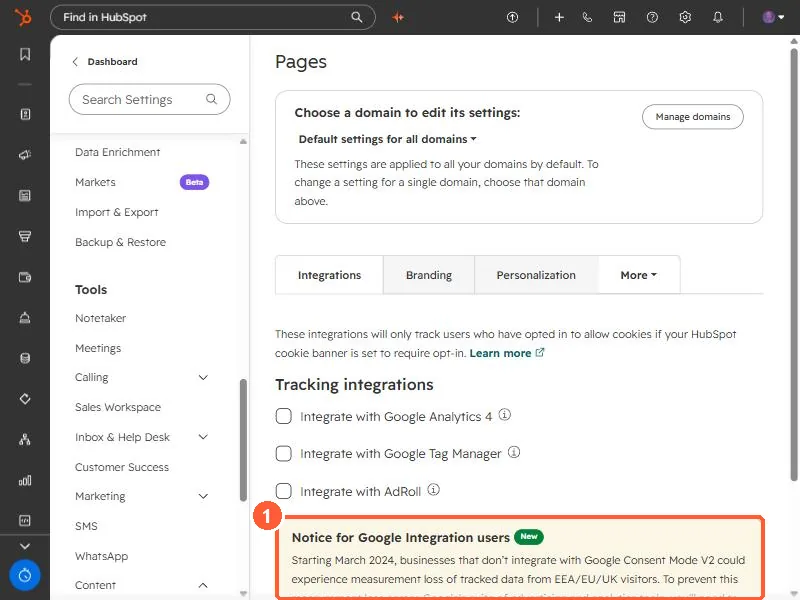
HubSpot can pass banner choices to Google as Consent Mode signals. HubSpot's KB says this only works in the EEA, EU and UK if a HubSpot opt-in banner shows to those visitors. My demo portal's page integration settings carry HubSpot's Consent Mode notice (1):
Implement Consent Mode yourself if:
- your site is not hosted on HubSpot,
- you do not connect Google Tag Manager or GA4 through HubSpot, or
- you use a cookie banner that is not HubSpot's.
Google set a March 2024 deadline. Sites without Consent Mode can lose measured data from those regions. HubSpot's developer docs cover implementing it with HubSpot's banner API.
4. Global Privacy Control
Global Privacy Control lets visitors send a privacy preference from their browser. Turn on Respond to Global Privacy Control signaling in the banner settings. It is set per banner, so check each default and domain banner. HubSpot notes your legal team is the right source for compliance advice.
5. Report on consent
Banner interactions are logged on contact records. Notify-style banner interactions appear in segments and reports only with the new banner editor.
6. What is changing for 2027
- Old banner editor migration. Accounts from before November 2022 are being moved to the new editor. Check your banners after the move, including domain overrides and the GPC switch.
- External domains need verifying. Domain banners in the new editor need a verified domain, so add and verify each external site.
- Consent signals feed reporting. In the EEA, EU and UK, Consent Mode decides how much Google can measure. A missing or misconfigured banner shows up as gaps in analytics and ad conversion data.
Common questions
Does HubSpot's banner block Google Analytics?
Not by itself. It controls HubSpot's cookies. Google's tags follow Consent Mode signals if you set them up through HubSpot or yourself.
Why do some cookies appear before the visitor accepts?
HubSpot's CDN sets necessary cookies such as __cf_bm for bot protection. HubSpot lists them as not requiring consent.
The banner shows on my WordPress site. Why?
Default banners show on every site with your tracking code. Add a domain banner for that site to change it.
Where do I turn on Global Privacy Control?
In each banner's settings: Respond to Global Privacy Control signaling.
Sources
- HubSpot Knowledge Base: Set up cookie tracking settings and consent banners
- HubSpot Knowledge Base: Cookies set in your visitor's browser by HubSpot
- HubSpot Knowledge Base: Understand and implement Google Consent Mode
- HubSpot developer docs: Implement Google Consent Mode
- HubSpot Knowledge Base: Turn on support for Global Privacy Control
- HubSpot Knowledge Base: Analyze cookie consent interactions