Quick tipHow toMarketing Hub

Install the Meta pixel, Google tag or LinkedIn Insight Tag through HubSpot

Connect the ad account first; then HubSpot adds the pixel wherever the tracking code runs.

Subscription
Marketing Hub Starter and up for ad conversion events
Permissions
Ads Publish permission
Time
3 min · Intermediate
Last verified

Short answer

HubSpot's KB: to install a pixel or tag such as the Facebook pixel, Google conversion tag or LinkedIn Insight Tag, connect the ad account first. Once installed it loads on all HubSpot-hosted or external pages with the tracking code, alongside it. Only the user who connected the Facebook Ads account can install that pixel, and installers need Ads Publish permission.

1. Connect first

Ads settings in my demo portal, with no accounts connected.
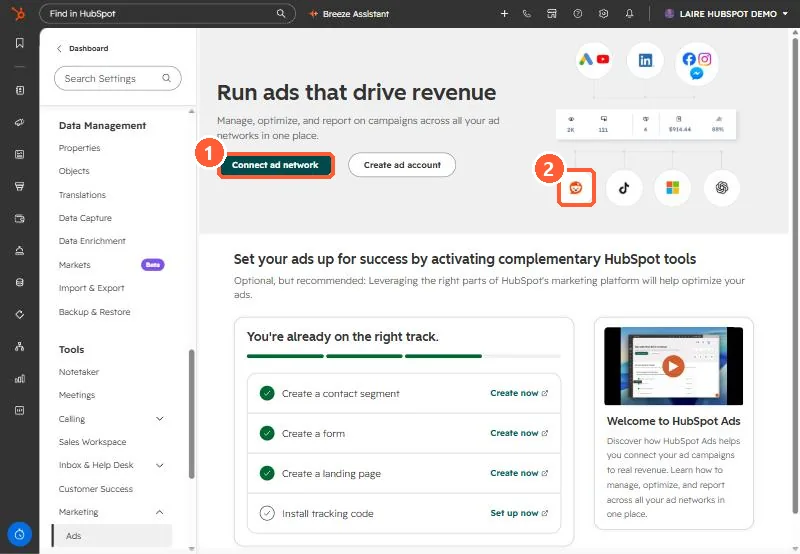
Ads settings with Connect ad network
Connect ad network (1) and one of the supported networks (2).

2. Consent

Pixels follow your cookie banner settings. See consent mode.

3. Related

Connecting ad accounts.

Sources

New field notes by email

One email when a new article publishes.

Still stuck?

If this did not fix it, the problem is probably specific to your setup. Book a call and we will look at it together.

Book a call with Sam